Key takeaways
BuddyPress is a strong WordPress plugin that lets you handle social networking for your websites.
The best alternatives to BuddyPress are EzyCourse. bbPress, PeepSo, BuddyBoss, MemberPress, Youzify, Wix, Ultimate Member, Hivebrite, and SocialEngine.
Nearly 33% BuddyPress users are finding some issues like email translations not working, site getting stuck, requiring too many plugins, and so on.
BuddyPress is a well-known community or forum management plugin for WordPress with over 100,000+ active installations.
WordPress users can enable social networking features on their website with the help of BuddyPress. The problem with BuddyPress is that it works only with WordPress.
So, if you have a website on another platform, you can’t use it. This is one of the key reasons why people look for an alternative to BuddyPress.
Another reason is that they want more advanced features than what BuddyPress is offering right now.
If you’re a member of one of these groups, don’t worry. There are some better alternatives to BuddyPress available out there.
In this blog, we will share 10 of the Best BuddyPress Alternatives in 2026. Let’s get started.
10 BuddyPress Alternatives in 2026
Here is a list of the 10 BuddyPress alternatives for 2026:
1. EzyCourse
2. PeepSo
3. BuddyBoss
4. Ultimate Member
5. bbPress
6. Youzify
7. Wix
8. MemberPress
9. Hivebrite
10. SocialEngine
Let's define each of the options in detail.
1. EzyCourse

EzyCourse offers an all-in-one solution for online educators and creators. It serves as a strong alternative to BuddyPress by combining course creation, community building, and membership site management in a single platform.
EzyCourse is a standalone platform, while BuddyPress is a plugin that runs inside WordPress. The platform offers a drag-and-drop site builder, a white-label mobile app, and other tools for your community, courses, memberships, or digital products inside. You can use it to launch community hubs for classes, educational content, or any membership-driven programs.
BuddyPress does social networking well, but EzyCourse wraps those social features into course delivery so creators can handle learners, discussions, and sales from a single dashboard. This helps creators manage everything in one place.
Overall, EzyCourse offers a more unified and feature-rich experience for course creators and community builders.
Unlike BuddyPress, it doesn't depend on third-party tools and plugins. It is packed with all the essential features you need to create interactive communities.
Key features
Community building and engagement: EzyCourse gives your users a lively activity stream by building a community where they can share news, drop comments, and react with likes, making the learning experience more social and engaging.
Course creation tools: You get access to all the tools needed to build and sell online courses. Plus, it gives you 800 free AI credits to create courses. You can also organize your content library, set up your branding, and so on.
Built-in coaching: The platform enables you to run one-on-one or group coaching, so learners get expert help when they want.
Branded mobile app: EzyCourse lets you launch your own branded mobile app. And, it’s free on the Unlimited and Elite plans.
Domains & white labeling: With domains and white labeling, you can drop in your own logo and name, change the URL, and keep tweaking the style, and eventually, the site really does start to feel like your own.
Built-in website builder: EzyCourse gives you an AI website builder so you can easily design and customize your site.
Sell digital and physical products: You can go beyond courses and sell physical and other digital products, too. EzyCourse helps you run your digital business and online store all in one place.
Marketplace for creators: You set up your full course marketplace that works like Udemy, so other creators upload, sell, and track their work while learners browse everything in one tidy hub.
Email marketing automation: EzyCourse includes built-in email marketing and automation tools. Unlike other course platforms, you don’t need to depend on any third-party tools for email marketing. Everything is set up for you within the dashboard.
Pros
One platform solution makes course creation, community building, and marketing much easier.
Facebook-like interactive community building.
No need for third-party plugins.
No-code and easy-to-use website builder.
The user-friendly interface helps creators manage their content easily.
Customizable branding allows complete control over appearance.
Built-in email marketing tools enable direct audience engagement without needing an external tool.
Flexible monetization options support subscription, membership, and payment.
Affordable pricing tiers make it accessible to creators with different budgets.
SCORM-compliant lessons work smoothly with other learning management systems.
Professional appearance develops brand identity.
Budget-friendly pricing structure.
Cons
No free plan.
No live streaming option on the Essential plan.
Pricing plans

1. Essential: $55/month (yearly)
2. Pro: $129/month (yearly)
3. Unlimited: $189/month (yearly)
4. Elite: $279/month (yearly)

2. bbPress

bbPress is a free, open-source forum plugin for WordPress known for its simplicity and integration with the platform.
It enables you to add discussion forums in WordPress without installing any other forum software.
bbPress is designed to be easy to use, fast, and clean. It is a popular option for adding forum functionalities to WordPress sites.
If you’re searching for a basic forum for conversations, bbPress is a better replacement for BuddyPress.
Key features
Quick setup: You can install bbPress the same way you add any WordPress plugin, right through your admin dashboard. No special steps or coding are needed.
Focus on simplicity: bbPress keeps things light. It avoids clutter so you can focus on running your forum without distractions.
Speed and performance: bbPress is built for speed. Your forums load fast and run smoothly even as they grow.
Handy customizing: You can change the look and features of your forum with any bbPress-compatible theme or plugin you already use.
WordPress integration: bbPress is built on the WordPress core, and the two systems blend together flawlessly. It uses your existing themes and user accounts.
Multisite support: You can use bbPress across a multisite network and create multiple forums under one WordPress setup.
Spam prevention: bbPress helps you keep spam out. Built-in tools make sure your community stays clean.
Clear user roles: bbPress has ready-made user roles like Keymaster, Moderator, Participant, Spectator, and Blocked that let you set precise permissions and keep the forum running smoothly.
Pros
Simplicity keeps the setup quick and easy for focused discussions.
Both admins and participants benefit from user-friendly experiences.
Functionality is enhanced via numerous third-party extensions.
WordPress support integration ensures a steady stream of updates.
Focused forum features support building and managing community discussions effectively.
Cons
Limited social features restrict user engagement compared to other platforms.
Basic design may look plain without extra styling or plugins.
Customization can be harder due to the lightweight framework.
Pricing plans
This platform is completely free to use, but it costs differently for its themes and plugins.
3. PeepSo

PeepSo is a WordPress plugin that transforms any website into a social networking platform.
It enables users to create a profile, share their content, and interact with people. You can also build communities and forums to keep your audience active on your platform.
PeepsSo has a user-friendly interface that closely resembles Facebook. It offers a complete set of community management features but costs much more than its competitors.
PeepSo is designed for those users who prefer a straightforward setup without technical expertise.
It gives a more refined feel as opposed to BuddyPress, which can be more complicated to configure and customize.
Key features
User profiles: With PeepSo, you can build full member profiles that include fields you choose and arrange any way you like.
Activity streams: You can post updates, add photos and videos, and react with likes, comments, or short emojis like Facebook.
Groups: PeepSo allows you to create public or private groups where people can gather, discuss, and share the subjects, hobbies, or interests that bind them.
Messages: You can let your users engage in private conversations through the built-in messaging system (included within one service, no need to create a different one).
Customization: You have the freedom to select every detail, from profile tabs to email templates, to even brand-new reaction icons, making it all your community.
Integrations: PeepSo effortlessly integrates with WooCommerce, Paid Memberships Pro, bbPress, and other popular WordPress plugins you are going to need for your perfect e-commerce, membership management, and forum integration.
Enhanced community building: PeepSo gives you every tool needed to build, grow, and keep a lively and loyal community around your blog, online shop, or project.
Pros
Easy-to-use interface facilitates user navigation and engagement.
Frequent updates mean more features and improved security over time.
Responsive customer service provides instant support when problems arise.
A Facebook-like layout makes users feel identified and comfortable with the platform.
Cons
The upgraded plugin requires a paid license, which can be a barrier for those with tight budgets.
A few free features may prevent some operations without upgrading.
Reduced customization might frustrate developers needing deeper control.
Pricing plans

1. Community Bundle: $124.50/year
2. Ultimate Bundle: $249.50/year

3. Power Suite: $7,117/year

4. BuddyBoss

BuddyBoss is a premium WordPress theme that can turn your website into a social networking platform.
This is essentially an enhanced version of BuddyPress. The platform offers you a more robust, feature-rich, and user-friendly experience for building online communities.
Although BuddyPress is a free and open-source social networking plugin for WordPress, it’s a complete and one-stop solution with a dedicated theme and various features.
As a strong contender, BuddyBoss has better media sharing, nicer profiles, and better group management and admin tools. But BuddyPress needs different plugins or custom improvements for these features.
This platform also offers a more streamlined experience with its integrated platform and theme. But, it does cost a lot, which is one of the reasons why users look for its alternative.
Key features
Premium platform: You get a premium platform by combining the power of BuddyPress and bbPress (a forum software) to build a beautiful and professional social network or community.
Feature-rich: You can message and share media (photos, videos, documents) as well as browse the forums, send private messages, and more. All of the tools your community needs are built in.
Integrated experience: BuddyBoss brings everything together under one admin panel. Updates stay in sync with the platform and theme.
Dedicated support: You have access to dedicated professional support whenever you need help. That’s something BuddyPress doesn’t offer.
Mobile app: BuddyBoss offers you a native mobile app, allowing your community to be available to your members anywhere.
Fork of BuddyPress: BuddyBoss is based on the core code of BuddyPress. But if you want more features out of the box and a more polished experience, BuddyBoss offers a lot to you.
Pros
Rich feature sets offer a wide variety of tools like social groups, forums, and private messaging, making the platform versatile.
Integration capability with popular WordPress plugins promotes community and e-commerce functionality.
Mobile application support makes it easier to access and use on the go.
Intensive attention to user engagement through features like reactions and GIPHY boosts interaction.
Active development and dedicated support ensure ongoing improvements and reliable assistance.
Cons
Higher cost can be a barrier due to subscription fees and additional hosting expenses.
A steeper learning curve may make setup and configuration challenging for new users.
Potential compatibility issues require careful plugin management to avoid conflicts.
Resource intensity demands robust hosting for smooth performance, increasing overall costs.
Pricing plans

1. Web Plan-
Pro: $299/year
Plus: $349/year
Done For You Bundle: $2499/year
2. App Plan-
Lite Edition: $79/month (yearly)
Full Edition: $179/month (yearly)
3. Bundle Plan costs $4,999
5. MemberPress

MemberPress is primarily a membership and LMS plugin. It can be a powerful alternative to BuddyPress for monetizing your content through subscriptions or online courses.
BuddyPress specializes in providing basic social community-building elements.
On the other hand, MemberPress specializes in providing more advanced features. You can develop and manage your membership levels, restrict content, and integrate payment gateways with MemberPress.
MemberPress offers you the necessary tools for generating revenue through memberships, subscription sites, and courses.
If you are looking for a platform with more monetization options and content restrictions, MemberPress is a great option. It can also work alongside BuddyPress, so you can get the best of both platforms.
Key features
Core function: You can create and manage your membership sites with various access levels and payment options.
Content restriction: MemberPress enables you to restrict content on your own posts, pages, custom post types, and other content that you designate by membership level with MemberPress.
Monetization: You can monetize content online with paywalls, sell subscriptions, and digital products, and create online courses using MemberPress’s robust tools.
Integration: MemberPress has a specific add-on to integrate with BuddyPress to link your membership level and features to BuddyPress groups and social functions.
Extensibility: MemberPress has multiple add-ons for your online courses (Courses and CoachKit) and other features.
Pros
Efficient membership management makes it easy for you to create levels, control access, and process payments.
Ease of configuration that appeals to users and auto-creation of the most important pages speeds up launching.
Gradual content release keeps members engaged by providing drip-fed material.
Built-in affiliate management supports marketing efforts without external tools.
Powerful integration with WordPress plugins and WooCommerce enhances functionality.
Support for major payment processing systems such as PayPal, Stripe, and Authorize.net for a smooth transaction business system.
Cons
Increased costs can inhibit access to advanced features.
Predefined options are typically limited if your brand is something special or your community's needs are complex.
Limited focus on community features means extra plugins are often necessary.
Pricing plans

1. Basic: $179.50/year
2. Plus: $299.50/year
3. Pro: $399.50/year

6. Youzify

Youzify can be considered a strong alternative to BuddyPress, particularly for those looking to enhance and customize their BuddyPress community experience.
Youzify is a plugin built to work with BuddyPress, adding advanced user profile features, extensive customizable widgets, and a range of community-focused tools.
It allows you to create a more robust and visually appealing social network. It aims to provide an engaging and feature-rich experience compared to a standard BuddyPress setup.
Key features
Enhanced user profiles: Youzify offers you a wide array of options for customizing your user profiles, including templates, widgets, and custom tabs, allowing for a unique brand experience.
Community engagement: Features like social walls, verified badges, emoticons, mentions, likes, and social login give you a more interactive and engaging community environment.
Customization: With over 700 options, Youzify offers you extensive customization possibilities, including 16 color schemes, 35+ widgets, and 14 header styles.
Monetization opportunities: Youzify allows for the creation of unlimited ad spaces on user profiles, potentially turning your website into a source of income.
Integration: Youzify seamlessly integrates with BuddyPress and other WordPress functionalities, making it easy to enhance your existing social network.
Ajax admin panel: The plugin's powerful Ajax admin panel provides you with a user-friendly interface for managing and customizing various aspects of the platform.
Pros
Modern interface enhances the overall user experience with visually appealing profiles and community sections.
Flexible customization allows site owners to personalize widgets, layouts, and user profiles for a branded look.
Advanced features such as social login, sharing, and ad tools extend BuddyPress's core capabilities.
Responsive support ensures quick help and reliable solutions, often praised by the user community.
Seamless integration with Paid Memberships Pro supports better control over subscriptions and user access.
Cons
The multitude of features and customization options may be daunting for new users.
Potential compatibility issues with certain WordPress themes.
Aggressive promotional pop-ups for upgrades and add-ons are intrusive.
May not have the established user base and community support for limited adoption.
Pricing plans
You can make a one-time purchase of the Youzify plugin fromCodeCanyonfor $49, which includes lifetime updates and 6 months of support. You can also use a free version of Youzify.
7. Wix

Wix is an AI-powered dynamic website builder. However, you can also use it as an alternative to BuddyPress in specific use cases, especially in community and social network building.
It’s a simple, visually attractive community-building platform with modest social networking features such as user profiles, forums, and activity feeds.
If you don’t want to deal with the technical complexities of WordPress and BuddyPress, Wix is a great option.
Wix focuses more on usability and design and less on advanced customization and complex social networking features.
Key features
User-friendly interface: Wix is known for its intuitive drag-and-drop editor, making it easy for you to build and customize a website, even without prior coding experience.
Design flexibility: Wix offers you a wide array of customizable templates across various categories, allowing you to create unique and visually appealing websites.
Social media integration: Wix has built-in features for social media integration, such as an Instagram feed and the ability to schedule social media posts.
Built-in marketing tools: Wix includes features like email marketing automation, which can be useful for you to communicate with your community members, announce events, or send out newsletters.
Scalability and hosting: Wix enables you to handle your website hosting and security, freeing users from the technical complexities of managing servers and updates.
Pros
Easy to use.
Drag-and-drop interface.
Good for basic websites and online stores.
Suitable for beginners.
Cons
Less customization compared to WordPress.
Limited functionality for complex social features.
Not specifically designed for community building like BuddyPress.
Pricing plans

1. Light: $17/month
2. Core: $29/month
3. Business: $36/month
4. Business Elite: $159/month

8. Ultimate Member

Ultimate Member is an excellent alternative to BuddyPress. It's known for being more user-friendly and focused on front-end customization.
If you find BuddyPress too complex, you can choose Ultimate Member to create your online community.
Ultimate Member is designed to be easier to use for non-technical users. It can be a good choice for building online communities and enjoying comprehensive user account management features.
With its extensions, it can achieve more than BuddyPress’s functionality.
Key features
Front-end user profiles: Ultimate Member allows you to create and manage your profiles entirely from the front end of your website, making it user-friendly and accessible.
Front-end registration & login: You can register and log in through forms displayed on the front end, eliminating the need to access the WordPress dashboard.
Member directories: Ultimate Member facilitates the creation of public or private member directories, giving you options to filter and sort members based on various criteria.
Account management: You can manage your accounts, update profile information, and change passwords directly from the front end.
Extensions: Ultimate Member offers a variety of extensions (both free and premium) to extend its functionality, such as integration with WooCommerce, Mailchimp, and even BuddyPress itself.
Pros
Intuitive interface simplifies membership setup and management.
Extensive customization enables tailored user profiles and registration forms.
Strong focus on membership makes it ideal for gated content.
Free core plugin reduces the initial cost for basic functionality.
Well-organized documentation assists with troubleshooting and setup.
Cons
Expensive extensions increase the total cost for advanced features.
Limited social networking features may not suit community-driven sites.
A resource-heavy setup can affect website speed and performance.
Slow support response may hinder timely issue resolution.
Pricing plans
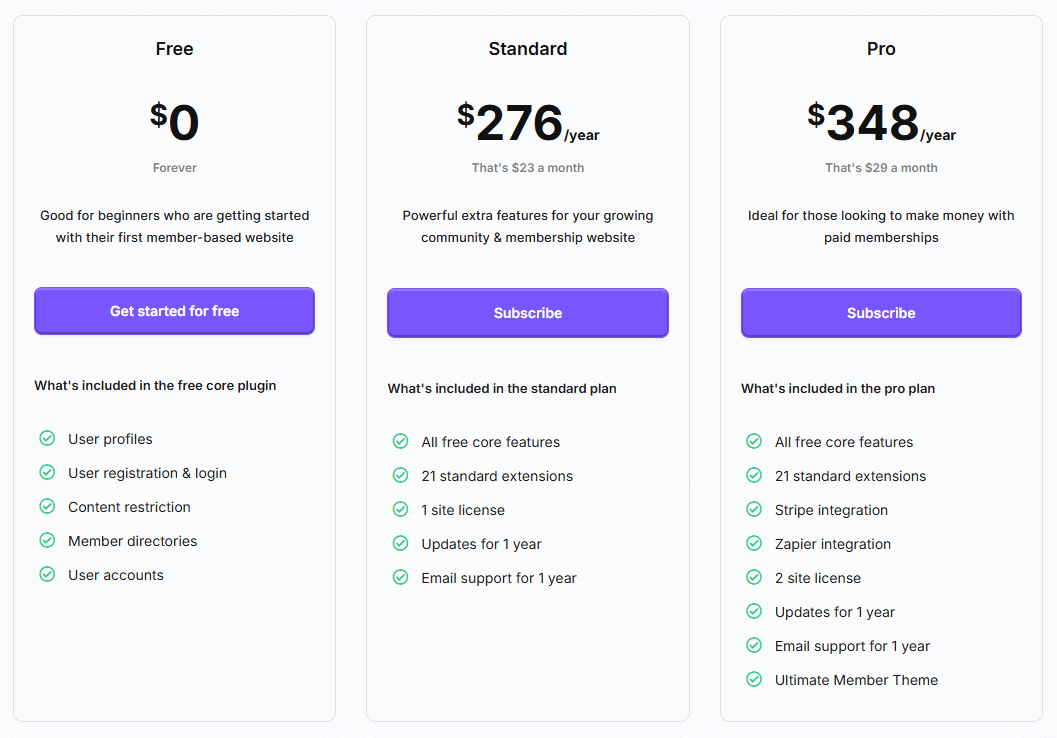
1. Free: $0 forever
2. Standard: $276/year
3. Pro: $348/year
9. Hivebrite

Hivebrite is a highly-rated platform for hosting online communities. It works seamlessly for businesses, organizations, and alumni networks.
It offers you a range of features for community engagement. These include membership management, branded communities, event management, and analytics.
Hivebrite provides a more robust and complete solution than BuddyPress. You can enjoy better customization flexibility with Hiverbrite.
Hivebrite also offers a more comprehensive set of tools. That's why it's often a preferred choice for organizations with more complex community management needs.
Hivebrite is a perfect platform for building a thriving online community.
Key features
Dedicated platform: Hivebrite is a dedicated platform with a broad range of built-in features for your community building, engagement, and management.
Branded experience: Hivebrite allows you to create a branded online community tailored to your organization's specific look and feel.
Comprehensive features: Hivebrite includes features like membership management, event organization, networking tools, discussion forums, and detailed analytics.
Focus on engagement: Hivebrite emphasizes features designed to foster your interaction and participation within the community.
Suitable for various organizations: Hivebrite is popular among alumni associations, educational institutions, nonprofits, and membership organizations.
Cloud-based: Hivebrite is a cloud-hosted solution, which means you don't need to worry about hosting and maintenance.
Pros
Comprehensive features streamline community management, communication, and events.
Branded mobile app strengthens user engagement and platform identity.
Advanced analytics tools help monitor member activity and engagement.
Event management supports both virtual and in-person events with ticketing and payment processing.
Ideal platform for educational, nonprofit, and professional communities such as alumni networks, non-profit volunteer groups, or corporate alumni.
Cons
Cost may limit accessibility for smaller organizations.
Customization can be difficult without in-house technical expertise.
Integrations with external tools are somewhat limited.
Documentation lacks clarity, making the setup more complex.
Analytics may not meet detailed data requirements for some users.
Pricing plans
This platform offers three pricing plans, which are Connect, Scale, and Enterprise. And, they all charge in a personalized way. To know the pricing amount of each plan, you have to book a demo.

10. SocialEngine
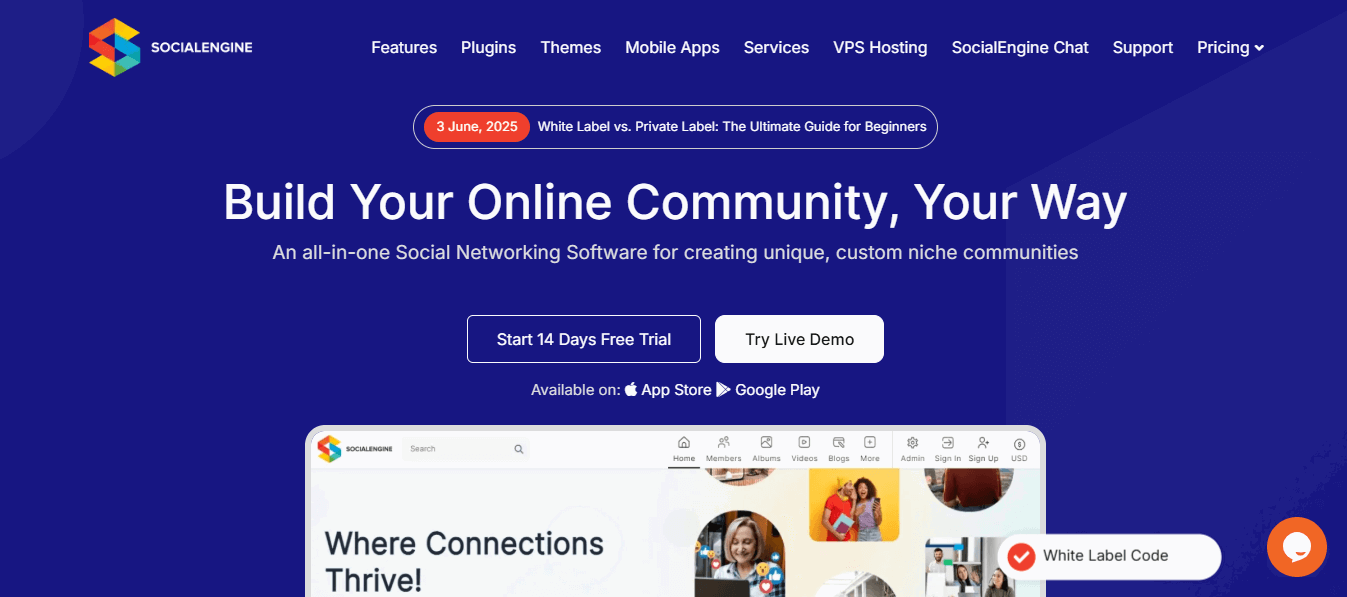
SocialEngine is an excellent alternative to BuddyPress for building your online social communities.
It offers a different approach with its own strengths and weaknesses. This is a premium, standalone platform.
SocialEngine provides a wider range of built-in features and customization options out of the box compared to BuddyPress, but it comes at a cost.
Key features
Social profiles: You can offer fully customizable user profiles. Members get to showcase their details through flexible fields and settings.
Activity feeds: SocialEngine brings everything to life with real-time updates from friends, groups, other members, and the entire community. It keeps you engaged and interacting with people.
Access control: You can decide who sees what. SocialEngine gives you detailed control over content visibility with public, private, and tiered options.
Community management: You have the moderation tools to keep everything running smoothly to manage content and users, and ensure a healthy community space.
Customization: SocialEngine lets you match the platform to your brand's aesthetic. You can customize layouts, themes, and even add your own CSS with ease.
Plugins: You can expand functionality with a rich collection of plugins and add features like blogs, forums, e-commerce stores, and more as your needs grow.
API: SocialEngine comes with an API that connects with other platforms. You can integrate external tools and services to extend your setup.
Cost: You pay a one-time fee to get started. Premium add-ons and support are also available if you need more power or help.
Scalability: SocialEngine grows with you. It’s built to support large communities as your platform expands.
Pros
Customization options allow users to tailor the platform to unique needs and branding.
A user-friendly interface makes it accessible, especially for non-technical users.
Feature-rich setup includes built-in messaging, member control, and plugin integration.
Modular extendibility enables easy addition or removal of specific features.
Cons
Cost involves a license fee, making it less budget-friendly than free alternatives.
Support availability may be limited without purchasing premium plans.
Complexity in advanced customization can challenge users without technical skills.
Plugin quality varies, leading to inconsistent user experiences.
Pricing plans
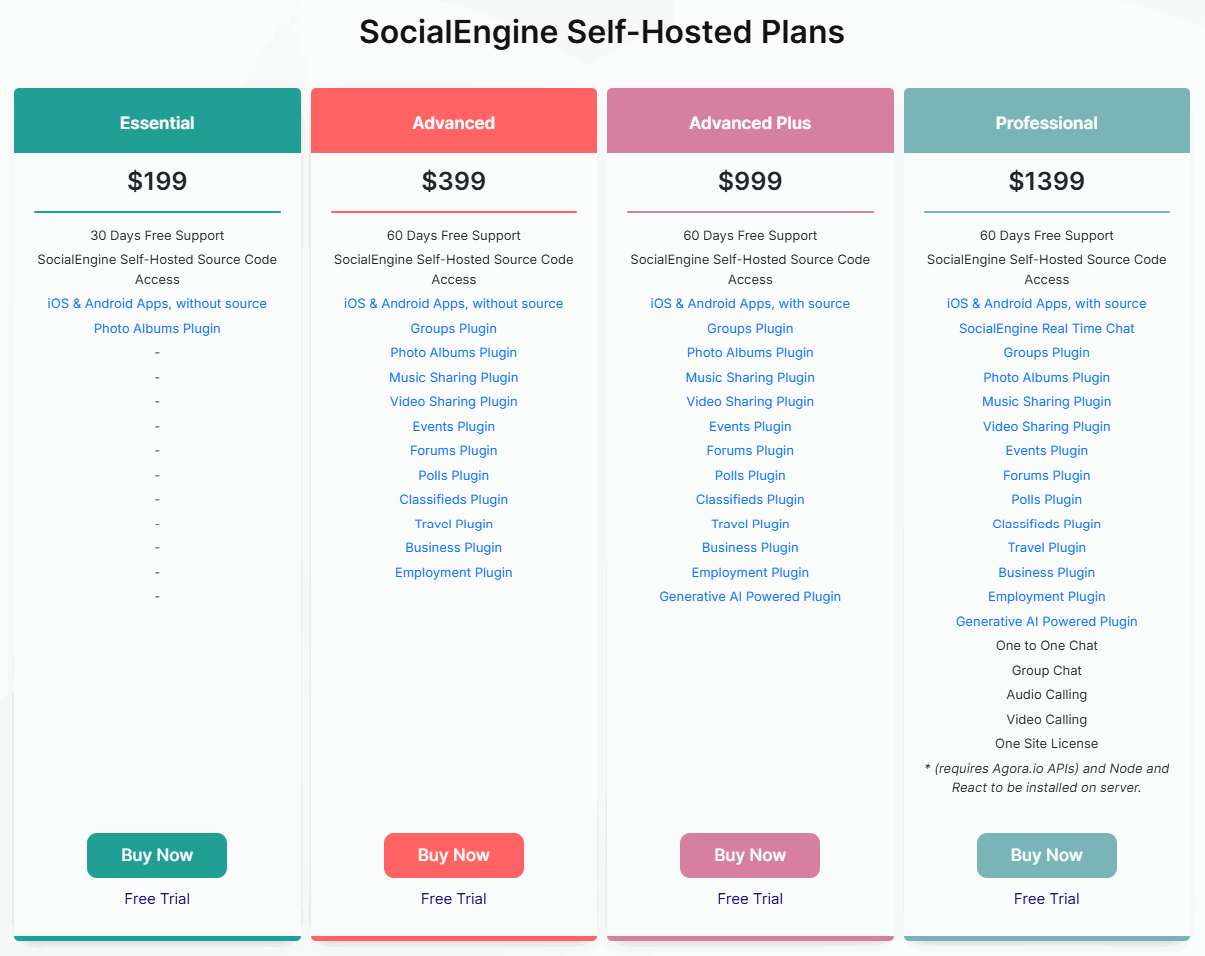
1. Self-Hosted Plans:

1. Essential: $199 (one-time payment)
2. Advanced: $399 (one-time payment)
3. Advanced Plus: $999 (one-time payment)
4. Professional: $1399 (one-time payment)
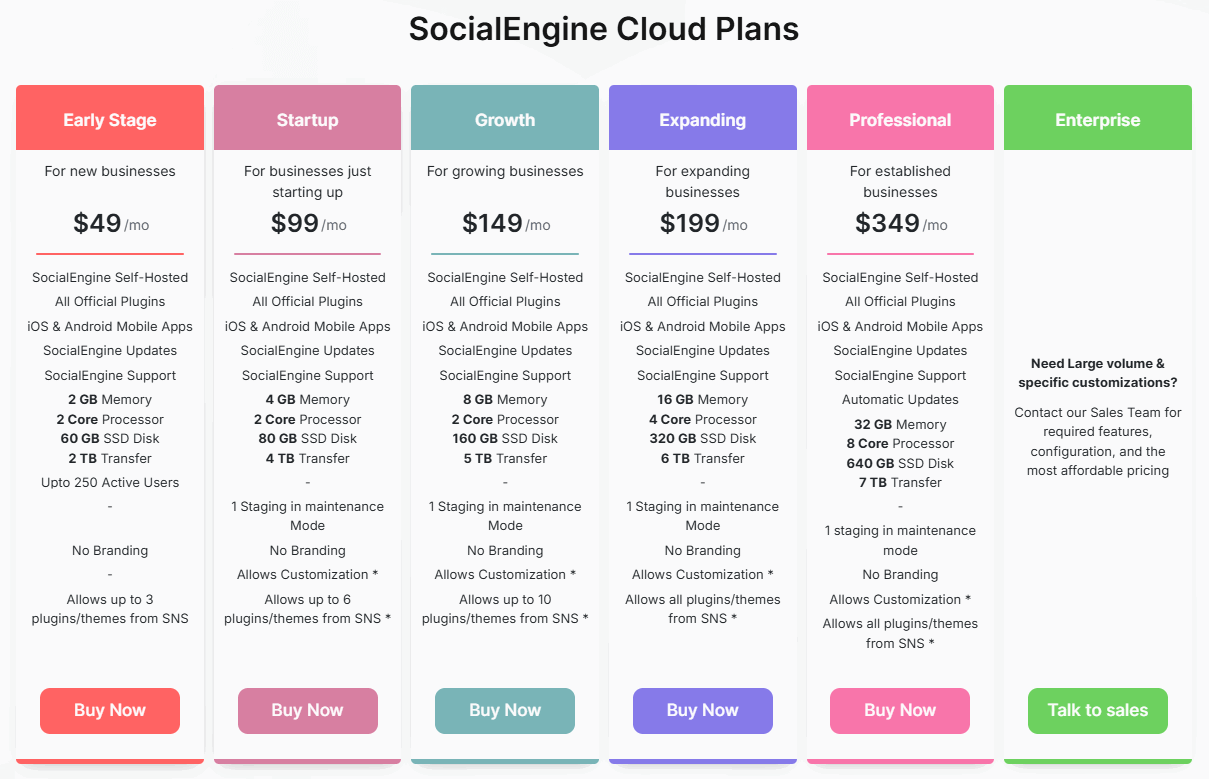
2. Cloud Plans:

1. Early Stage: $49/month
2. Startup: $99/month
3. Growth: $149/month
4. Expanding: $199/month
5. Professional: $349/month
6. Enterprise: Custom pricing
Why EzyCourse is the right BuddyPress alternative?
Here's why EzyCourse can be a suitable BuddyPress alternative:
Get free AI credits to generate content ideas and outlines.
Contain an AI site builder to make websites with unique designs.
Includes a Facebook-like community and handles social networking aspects from one place.
Find email marketing and automation options to market or reach audiences.
Get coaching programs with dedicated live streaming options.
Gather all users in the community with feed, posts, spaces, private chat, group chat, events, and other options.
It doesn’t contain design flaws like BuddyPress and offers a clear interface with a clear dashboard.
Offer deep admin integration with role options that you can assign based on your team's positions.

Final Verdict
The best BuddyPress alternative depends on your preference and community-building goals.
We shared all the popular BuddyPress alternatives in this blog, so now the ball is in your court. Explore the options and pick the one that suits your vision the best.
If you want our suggestion, go with EzyCourse as it is the most advanced and complete community management platform right now.
Explore the platform with the free trial, create a community, and see how easy it is to manage.
Hope it helps!

Frequently Asked Questions
Why look for alternatives to BuddyPress?
If you are finding issues with BuddyPress, like old UI/UX, terrible admin settings, no dedicated sections, and so on, it’s better to look for BuddyBoss alternatives.
What are some alternatives for creating a private social network?
EzyCourse, PeepSo, and BuddyBoss are some of the alternatives to BuddyPress for creating a private social network.
Are there any free or open-source alternatives to BuddyPress?
Yes. bbPress, EzyCourse, and PeepSo are a few free or open-source alternatives to BuddyPress available.
Which is a top alternative for building online learning communities?
EzyCourse is a top alternative for building online learning communities. It’s for community features, modern UI/UX, and simple setup.
What factors do I consider when choosing a BuddyPress alternative?
You need to consider community features like feed, forums/spaces, and chat, mainly when choosing a BuddyPress alternative. Plus, think of price, site builder, and other convenient options.