
Key Takeaways
Kajabi vs Teachable vs Thinkific comes down to one trade-off: power, simplicity, or balance. Kajabi is the most powerful. Teachable is the simplest. Thinkific sits between them.
The pricing gap is wide. Kajabi starts at $143/month. Thinkific starts at $99/month. Teachable starts at $39/month (but charges a 7.5% transaction fee).
Kajabi wins on marketing. Built-in funnels, deep email automation, and segmentation come standard. Teachable and Thinkific need third-party tools for the same features.
Teachable wins on ease of use. Fast setup. Clean dashboard. Best for first-time creators. Thinkific wins on value. Unlimited courses, coaching tools, strong selling tools, even on lower plans. Marketing stays basic.
Community features rank: Kajabi > Thinkific > Teachable. Kajabi feels like a social hub. Thinkific allows multiple communities on higher plans. Teachable stays limited to lecture comments.
None of the three feels complete in 2026. Kajabi costs too much for beginners. Teachable locks key features behind upgrades. Thinkific needs extra integration for marketing. Alternatives like EzyCourse, LearnWorlds, and Podia now offer more at lower prices.
Starting an online course feels exciting at first. Then comes the big question.
Which platform should you trust with your work?
In 2026, many creators still compare Kajabi, Teachable, and Thinkific. They all sound great. But once you dig in, the differences become clear.
Some tools are powerful but expensive. Some are easy but limited. Some help you sell better, while others focus only on teaching.
That’s why picking the wrong one can slow you down.
To help you out, I’ll break down the comparison among Kajabi vs Teachable vs Thinkific in a simple way. We will look at features, pricing, and ease of use.
Besides, I’ll also talk about newer alternatives that give more freedom and better value. By the end, you will know what really fits your goals in 2026.
Kajabi: Built for Selling and Marketing Courses

Kajabi s a platform made for people who teach online. It helps turn knowledge into a real business. You can sell courses, coaching, memberships, and more.
Everything works from one dashboard, so you do not need many tools. This makes work feel simpler and cleaner.
Many experts trust Kajabi. Over 100,000 businesses use it today. Creators have earned more than 10 billion dollars using the platform.
Also, millions of students learn through Kajabi sites. This shows Kajabi is stable and proven.
Kajabi helps you look professional. You can build websites, send emails, and create sales funnels. Pages look good on phones and laptops. Students get a smooth learning space. This helps build trust fast.
Kajabi saves time because tools are connected.
Payments, emails, and content work together. You do not need to fix broken links between apps. This helps you focus on teaching and selling.
But Kajabi has downsides. The price is high, especially for beginners. Even the lowest plan costs more than many other platforms. New creators may feel pressure before earning money.
Even, it can also feel heavy at first. There are many tools and settings. Learning everything takes time. Some users feel confused in the beginning.
Customisation is decent, but not full freedom. Some design changes feel limited. Advanced users may want more control.
Kajabi works best for serious creators. If you already have an audience, it fits well. If you are just starting, it may feel too costly. In this case, you may look for Kajabi alternatives.
So, What Essential Features Thinkific Usually Offer:
Kajabi lets you create full courses with video and text. Lessons are easy to organize. Students move smoothly through content.
You can sell one-on-one or group coaching. Sessions feel structured. Payments are handled inside Kajabi.
It supports monthly memberships. Content can unlock over time. This helps create a steady income.
You can build private communities. Members can post and comment. This keeps people engaged longer.
This platform includes email tools. You can send broadcasts and automated emails. No extra software is needed.
It has ready-made funnels. These help turn visitors into buyers. Pages connect smoothly.
You can build websites without coding. Templates are clean and fast. Setup feels simple.
You can create unlimited landing pages. These help collect leads. Pages are built for sales.
Kajabi handles payments securely. Checkout feels smooth. Buyers trust the process.
You can sell files like guides and tools. Access is instant. Management is easy.
It offers a branded app. Students can learn on the go. This feels premium.
Kajabi automates tasks. Emails and access updates by rules. This saves time daily.
Pricing Details with Features

The Kickstarter plan costs $89 per month.
It allows one product, one website, and 250 contacts. This plan is very limited but works for testing ideas.
The Basic plan costs $179 per month.
It allows five products and more contacts. Email and funnels become more useful here.
The Growth plan costs $249 per month.
You get up to 50 products and 25,000 contacts. Automation and team tools unlock here.
The Pro plan costs $499 per month.
It gives unlimited products, more websites, and many admin users. This plan fits big teams.
Kajabi does not take a cut of your sales. Payment fees still apply.
Best Things About Kajabi
All-in-one platform
Strong email tools
Built-in funnels
Clean design
Mobile friendly
No revenue sharing
Good automation
Scales well
Premium feel
Long-term value
You May Not Want to Ignore These Limitations About Kajabi
High starting price: Kajabi’s plans start at a higher price than many competitors, which can be tough for new creators or small businesses on a budget.
Not beginner-friendly: Its wide range of tools can feel overwhelming for beginners, making the learning curve steeper than simpler platforms.
No low-cost plan: Kajabi doesn’t offer a really low-cost option, so those looking for a cheap starter solution may need to look elsewhere.
Takes time to learn: Even with templates and tutorials, mastering Kajabi’s full features requires patience and time investment.
Design limits: While customizable, some users feel the design flexibility isn’t as freeform as fully custom web builders.
Too big for small creators: For creators with only a few courses or a small audience, Kajabi’s extensive tools may be more than they actually need.
Contact limits by plan: Your email marketing and contact lists are capped based on the plan, which can require upgrades as your audience grows.
Advanced features cost more: Some features, like advanced automations or analytics, are only available on higher-tier plans, adding to overall costs.
Teachable: Online Course Platform For Teaching

Teachable is a platform made for people who teach online.
Actually, it helps turn skills into income. You can teach languages, fitness, coding, or any topic. Everything works in one place. Courses, coaching, payments, and students all stay together.
This platform is used all over the world. Creators on Teachable have earned over 10 billion dollars. More than 100 million students have learned on it.
People in over 180 countries use the platform. This shows strong reach and trust.
However, the platform feels clean and easy. You can build products from one dashboard. You can manage students without stress.
Your students get a simple space that works well on phones and tablets. Learning feels smooth.
Also, Teachable supports many learning styles. You can teach live or on demand. You can use video or text. Students can learn anytime. This helps reach more people.
It helps with business tasks. Payments and taxes are handled for many regions. VAT and global taxes are managed. This saves time and avoids headaches.
But Teachable has downsides. The Starter plan takes a transaction fee. This can hurt early sales. Some features are locked behind higher plans. Beginners may feel limited.
Design options are clean but basic. Deep customization is limited. Advanced users may want more control.
So, all in all, Teachable works best for educators who want ease and scale. It may not fit creators who want full design freedom. Still, it is reliable and trusted.
So, What Essential Features Teachable Usually Offer:
You can create video-based courses. Quizzes and drip content are supported. Students can learn at their own pace. Mobile access is smooth.
It supports one-on-one coaching. Group sessions also work. Scheduling and payments are simple. Everything stays organised.
You can sell guides and templates. Files are delivered instantly. This works well for quick offers. Easy to manage.
You can build monthly subscriptions. Content unlocks over time. This helps create a steady income. Members stay connected.
Students get a clean dashboard. They can track progress easily. Navigation feels simple. Learning stays focused.
Teachable has iOS and Android apps. Students can learn anywhere. This boosts engagement. Very useful for busy learners.
You can build courses easily. No tech skills needed. Content uploads are fast. The setup feels friendly.
AI helps create course outlines. It helps with quizzes, too. This saves time. Good for beginners.
Teachable supports global payments. Students can pay from many countries. Checkout feels smooth. Trust stays high.
Teachable handles VAT and sales tax. This works for many regions. It removes stress. Creators focus on teaching.
You can add extra offers at checkout. This increases order value. Sales grow naturally. Easy to set up.
You can let others promote your courses. Affiliates earn commissions. This helps reach new audiences.
Pricing Details with Features

Starter plan costs $39 per month.
It allows one published product. A 7.5 percent transaction fee applies. This plan is best for testing ideas.
Builder plan costs $89 per month.
It allows five products. There are no transaction fees. Certificates and affiliates are included.
Growth plan costs $189 per month.
You can publish 25 products. White labelling is included. Free subtitles and translations are added.
The advanced plan costs $399 per month.
It allows 100 products. Integrations are unlimited. This plan fits large teams.
Unlimited plans are custom-priced for big businesses.
Best Things About Teachable
Trusted worldwide
Mobile apps included
Strong tax handling
Good for scaling
AI creation tools
Clean student experience
Global payments
Certificates included
Affiliate system
Reliable uptime
Good support
You May Not Ignore These Limitations About Teachable
Transaction fees on Starter: The basic plan charges transaction fees, which can eat into earnings for new creators.
Limited design freedom: While templates are easy to use, customizing layouts and designs is somewhat restricted.
Features locked on low plans: Many advanced tools are only available on higher-tier plans, limiting what beginners can do.
Costs rise fast: As your business grows, upgrading plans to access more features or contacts can become expensive quickly.
Basic site design: Starter plans offer simple website designs that may not feel professional for bigger brands.
Less control for dev users: Developers or tech-savvy users may find limited flexibility to implement custom code or advanced tweaks.
Branding removal costs more: Removing Kajabi branding requires higher-tier plans, so full white-labeling isn’t cheap.
Not ideal for tight budgets: For small creators or startups, Kajabi’s pricing can be a barrier compared to cheaper alternatives.
👉Start Your Online Course Business Now!
Thinkific: A Simple Course Platform Focused on Teaching

Thinkific is a platform made for teaching online.
Usually, it helps people turn knowledge into courses. You can teach skills, train teams and sell learning in one place.
Many teachers, coaches, and companies use Thinkific. Over 35,000 customers trust it. Together, they have earned billions. That shows the platform works well.
In fact, this platform feels easy from the start. You do not need tech skills. Many users launch in just weeks.
Here, you can sell more than courses. You can sell downloads, run memberships, and host live coaching. Everything stays under your brand name.
Even selling tools is strong. You can add coupons, bundle products and recover lost sales. Taxes are handled for some countries. This saves effort.
Support is a big plus. Help is fast and friendly. It has won service awards. This matters when you are stuck.
However, Thinkific has some limits that users often notice over time. It does not come with strong built-in marketing tools. Email marketing is very basic, so many creators need another tool. This can add extra cost and extra work.
The checkout and sales features are also simple. You cannot customize funnels much. Upsells and advanced sales flows are limited compared to other platforms. If selling is your main goal, this can feel restrictive.
Pricing can be tricky as you grow. The free plan has limits, and advanced features come only on higher plans. When you add extra tools, the total cost can rise fast.
Thinkific is solid for teaching. But for creators who want strong marketing, community, and all-in-one control, it may feel incomplete.
So, What Essential Features Thinkific Usually Offer:
Thinkific lets you create unlimited courses. You never have to delete old ones. You can keep adding new ideas anytime. This is great when your business grows slowly.
You can upload videos without stress. Quizzes help test what students learn. This makes lessons more fun. Students stay active and alert.
It includes a community space. Students can talk and share thoughts. They can message each other, too. This helps build strong connections.
You can sell ebooks and files. Workbooks and templates also work well. Students get instant access after payment. This is great for quick sales.
AI helps you create course ideas faster. It helps with lesson structure. This saves a lot of time. It is helpful for new creators.
You can build pages by dragging items. No tech skills are needed. Everything feels simple and clean. You can launch faster.
You can use your own website name. Your brand looks real and strong. Students trust custom sites more. It feels professional.
Thinkific gives strong selling tools. You can add coupons and bundles. Upsells increase order value. Selling feels natural.
If someone leaves without buying, Thinkific helps. Emails are sent automatically. This brings buyers back. You save lost sales.
Students can pay in different ways. Payment plans are available. This helps more people buy. Sales become easier.
Thinkific handles tax for some regions. This includes the US and Canada. EU and UK taxes are simpler too. This saves time.
On higher plans, branding is clean. Thinkific logos can be removed. Emails match your brand. Your business looks polished.
Pricing Details with Features

Start plan costs $99 per month.
It includes unlimited courses, one community, five digital downloads, and basic sales tools. You also get cart recovery emails and analytics.
Grow plan costs $199 per month.
It adds live classes with Zoom. You get memberships, certificates, bundles, and better design control. This plan fits growing creators.
Expand plan costs $499 per month.
It adds 10 communities, invoicing, admin accounts, API access, and priority support. This plan is good for teams.
Thinkific Plus has custom pricing. It includes SCORM, SSO, CRM tools, advanced analytics, and full onboarding. It is built for large businesses.
Best Things About Thinkific
Easy to use
Clean interface
Strong selling tools
Fast setup
Unlimited courses
Good support
Scales well
Custom branding
Community features
AI help tools
Trusted by big brands
Many product types
You May Not Ignore These Limitations About Thinkific
Thinkific is good for teaching, but it has limits.
Weak marketing tools: Thinkific does not have strong built-in marketing. Email automation, funnels, and advanced sales tools are very basic. Many users need extra tools.
No built-in email marketing: You must connect third-party email tools. This adds extra cost and setup work.
Limited design freedom: Website and page designs are clean but not very flexible. Custom branding feels restricted compared to other platforms.
No native community features: Thinkific does not offer strong communities like forums or group chats. You need outside platforms for engagement.
Upsells are basic: Sales features like order bumps and advanced upsells are limited. This can affect total revenue.
Transaction fees on lower plans: The free plan includes transaction fees, which can eat into early earnings.
Mobile app costs extra: A branded mobile app is not included. It requires an add-on and a higher cost.
Less all-in-one feel: Thinkific focuses on courses only. To run a full business, you will need multiple tools.
Kajabi vs Teachable vs Thinkific:Which Is Better in 2026?

You might be wondering that Kajabi vs Teachable vs Thinkific which is better? Well, well. There is no single straightforward answer to this question. So, we will take you through a rigorous discussion and let you know every detail about the platforms.
1. Core Purpose and Focus
Kajabi feels like an all-in-one business suite. It tries to replace many tools like email, website, funnels, courses, and communities. Everything lives together. It’s strong if you want one place for your entire business.

Teachable focuses more on teaching and course delivery. Its tools are made to help educators share content easily. Email and funnels exist, but they feel simpler.

Thinkific focuses on ease and growth. It feels balanced for courses, communities, downloads, and memberships. It gives strong selling tools without locking too many basics behind high plans.

Big picture: Kajabi is business-rich, Teachable is teaching-rich, Thinkific is growth-balanced.
Pricing and Value
Kajabi is the most expensive. Its lowest plan starts high, and plans jump up quickly. But it includes many tools you would pay separately for on other platforms.
Teachable has multiple tiers with a 7.5% fee on Starter. Higher plans remove fees. It gives solid tools at a more affordable step-by-step price.
Thinkific offers plans that feel closer to beginner budgets. It lets you start cheaper and add more features as you grow.
Big picture: Kajabi costs more upfront, Teachable charges fees on cheap plans, and Thinkific feels friendlier to new creators.
Sales Funnels and Marketing Tools
Kajabi has built-in funnels and landing pages that are ready to launch. These are more powerful and integrated. They feel like real business automation, not add-ons.

Teachable has basic landing pages and email features. Funnels exist, but they feel simpler and require more setup to match Kajabi.

Thinkific has good selling tools, like upsells and cart recovery. Funnels are less strong than Kajabi, but the selling features are solid.

Big picture: Kajabi is strongest for funnels, Thinkific is next, and Teachable is simpler.
4. Email Marketing and Automation
Kajabi has the most advanced email tools. You get automated sequences, tags, segments, and analytics all connected to the platform.

Teachable’s email tools cover basics, broadcasts and simple automations. They get the job done, but not deep personalisation or CRM-style tracking.

Thinkific gives good built-in email and integrates with other tools if you want stronger features. Automation is solid, but not as deep as Kajabi.

Big picture: Kajabi leads in email power, Thinkific is strong, and Teachable is basic.
Built-in Communities
Kajabi includes community features that integrate with courses, emails, and funnels. It feels like a social space inside your business.

Teachable has community tools, but these aren’t as rich. They work well, but lack deep engagement features.

Thinkific gives up to multiple communities on some plans. It’s good for groups and cohorts. It sits between Kajabi and Teachable in depth.

Big picture: Kajabi > Thinkific > Teachable for community features.
Ease of Use and Onboarding
Teachable feels easiest for total beginners. The interface is clean and simple. You can build your first product fast without complexity.
Thinkific is also easy, but a little more detailed. It gives more options and features without losing clarity.
Kajabi is rich in tools, but that means learning more. It can feel overwhelming at first.
Big picture: Teachable is the simplest, then Thinkific, then Kajabi.
Customization and Design Control
Kajabi allows advanced design, especially in landing pages and funnels. It gives more flexibility, but customization still stays within set blocks.
Thinkific gives strong design control, with custom code options on higher plans. It feels good for creators who want branding control.
Teachable has a solid design, but more templates and fewer deep custom code options than Thinkific.
Big picture: Thinkific > Kajabi > Teachable in deep customization.
Mobile Learning Experience
All three support mobile learning, but they do it differently.
Kajabi offers a branded mobile app option. This feels premium and helps your students learn on the go. To get a branded mobile app for your website, you have to pay an additional $199 per month.

Teachable has a free mobile app that learners like. It keeps students engaged and feels easy to use.

But keep in mind that, unlike Kajabi, Teachable does not offer a custom-branded app.
Thinkific offers a custom white-label mobile app at $199/month as an add-on.

Big picture: Kajabi & Teachable lead for mobile, Thinkific is good but less focused on apps.
Payments and Revenue Tools
Kajabi handles global payments, subscriptions, and checkout pages without extra tools. Payment options are rich and built into plans.
Teachable also handles payments and taxes globally. It supports upsells and recovery, but deeper options may need upgrades.
Thinkific has strong commerce tools, too. It adds things like automatic tax remittance in some regions. It gives more international tax ease.
Big picture: All handle payments well, but Thinkific and Kajabi feel more advanced than Teachable.
Course Features Like Quizzes and Certificates
Teachable adds features like quizzes and completion certificates. These help learners feel rewarded.
Thinkific also includes quizzes, assignments, and custom paths on higher plans.
Kajabi has strong course delivery, but in some cases, these features feel less rich than Teachable’s out-of-the-box.
Big picture: Teachable and Thinkific lead for learner engagement features, Kajabi focuses more on business features.
AI Tools and Content Creation
Kajabi includes AI features like a universal inbox and automations that help manage workflows.
Teachable offers AI creation and translation tools, auto subtitles, quiz generators, and course starter help.

Thinkific also offers AI tools to assist with course building and content creation. It fits well for beginners.

Big picture: Teachable’s AI tools feel geared toward quick course building. Thinkific and Kajabi include AI, but in different ways.
Scalability for Big Businesses
Kajabi’s Pro plan and higher tiers feel built for large teams and complex workflows. They include many admins and tools.
Thinkific’s higher plans include API access and advanced commerce tools for large-scale use.
Teachable’s Unlimited and enterprise plans add strong tools, but at higher pricing and custom quotes.
Big picture: All three can scale, but Kajabi and Thinkific feel more structured for business growth.
Support and Customer Help
Kajabi has strong support with live help and resources. It feels quick but tied to higher plans.
Teachable provides good support, and many users say onboarding help is useful. It also has strong help guides and a community.
Thinkific has award-winning support and many helpful guides. Response is often fast and friendly.
Big picture: Thinkific leads in support quality, then Kajabi, then Teachable.
So, Which One is Better: Kajabi vs Teachable vs Thinkific in 2026?
While considering all three platforms: Kajabi vs Teachable vs Thinkific, you have to choose wisely.
But they target slightly different creators.
Kajabi feels business first. It is rich, deep, and powerful. Best if you want one platform for everything.
Teachable feels teaching first. It is simple, friendly, and focused on educators.
Thinkific feels growth balanced. It is easy to use but still strong in selling tools, analytics, and tax handling.
Best choice in 2026 depends on you:
Choose Kajabi if you want full business tools and depth.
Choose Teachable if you want easy course building and student engagement.
Choose Thinkific if you want balance, scalability, and strong selling features.
But, Is There any Better Alternative?
Yes, better alternatives to Kajabi vs Thinkific vs Teachable depend on what you need.
Actually, the big three are strong, but they have downsides that make some creators look for other options.
Kajabi is powerful but very expensive.
Many tools are built in, but small creators may not need them all. Its learning curve is steep, and you can feel lost at first.
Teachable is easy and great for course delivery.
But its starter plan takes high transaction fees. Advanced business tools, funnels, and customization are limited unless you pay more. Some creators feel locked in.
Then, Thinkific is flexible and beginner‑friendly.
But its marketing automation and funnel features are not as strong as Kajabi. You may still need extra tools for advanced email flows, marketing, or design freedom.
Because of these issues, many people choose other platforms that are simpler or cheaper, especially when just starting.
In the next part, we’ll discuss some better alternatives.
👉Choose the Right LMS For You!
Top Smarter Alternatives: Kajabi vs Teachable vs Thinkific vs Other LMS
Well, Kajabi, Teachable, and Thinkific are popular, but they don’t fit every creator’s needs. Some are expensive, some lack key tools, and others may feel too complex or limited.
That’s why many creators are now looking at newer and smarter alternatives. These platforms offer strong course features, built-in marketing, easy setup, and better pricing for beginners and growing businesses.
Below, I’ll focus on some of the best alternatives that give you more flexibility, value, and growth options in 2026:
EzyCourse

EzyCourse is an all-in-one platform for course creators, coaches, and entrepreneurs.
It lets you build courses, run communities, sell memberships, and manage coaching all from one place.
You can also send emails, host live sessions, and create websites. Everything connects smoothly, so you don’t need extra tools.
Actually, the platform focuses on making online teaching and business easy. You can create courses with multiple lesson types, assignments, and quizzes.
Also, it supports SCORM files and DRM protection for secure content.
Communities, group chats, and private messaging keep students engaged. EzyCourse also has built-in mobile apps for Android and iOS so learners can access content on the go.
The platform includes advanced features like
Multi-currency pricing
AI subtitles
Native meeting and webinar platform*
Automated email campaigns
Gamification
And appointment booking.
Even the drag-and-drop builder and customizable templates make site creation simple. It also offers analytics and reporting to track student progress and business growth.
With over 3,000 members and glowing reviews, EzyCourse is recognized for its ease of use, fast page loading, and constant updates.
Support is available 24/7, including VIP support on higher plans, ensuring creators get help anytime.
Overall, EzyCourse replaces multiple platforms, saving money and time while empowering creators to grow and monetize their expertise.
Features That Make EzyCourse a Good Alternative
AI Course Builder
You can create unlimited courses in one place. Add videos, text, quizzes, and files easily. Drip content helps you release lessons step by step. This keeps students learning at a steady pace. Here are some glimpses of how the course interface looks inside EzyCourse:


Coaching Programs
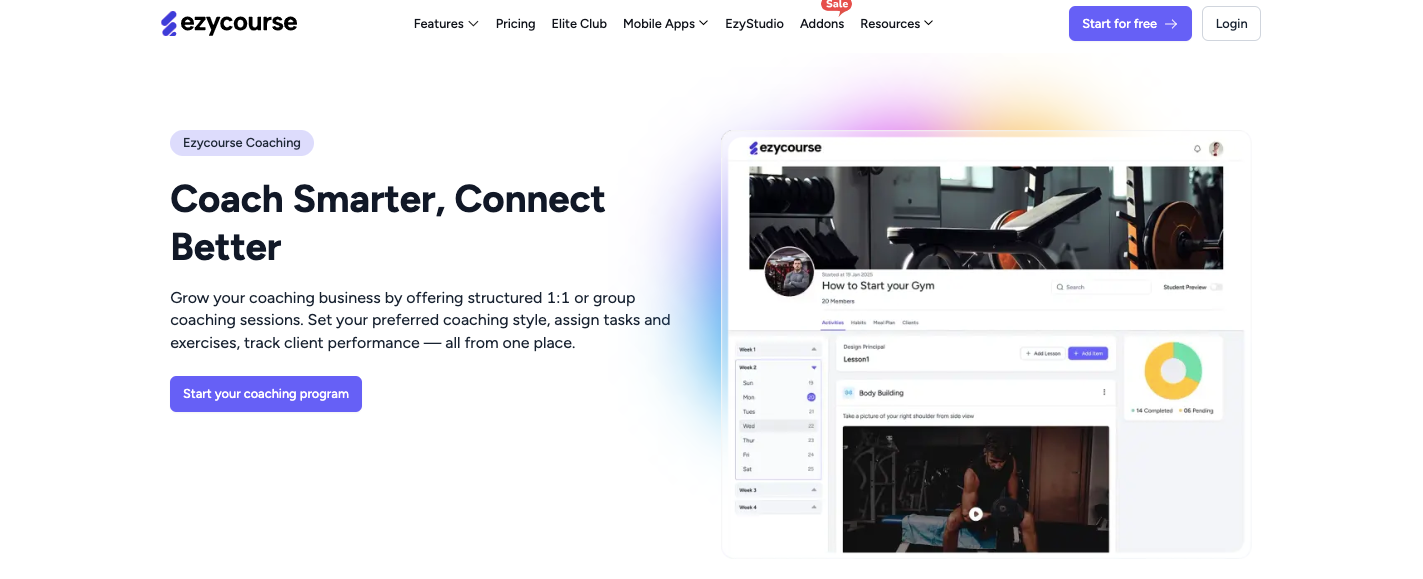
Run one-on-one or group coaching without extra tools. You can plan weekly sessions or full programs. Track each client’s progress in one dashboard. It feels personal and organised.
👉Start Your Coaching Business Now!
Communities
Build private groups for your students. Add different channels for topics and chats. You can charge for monthly or yearly access. This helps learners stay active and connected.
Email Marketing

Send emails directly from the platform. Create newsletters, sales emails, and follow-ups. Automations save time by sending messages based on user actions. Push notifications help reach users faster.
Mobile App

Learners can use native iOS and Android apps. They can watch lessons anytime, anywhere. Apps keep students engaged with alerts and updates. This improves course completion.
👉Get A FREE Custom Mobile App Now!
Drag-and-Drop Website Builder

Build your website without coding skills. Use ready-made templates and edit them easily. Change text, colours, and sections in minutes. It’s simple and beginner-friendly.
Multi-Currency and Geo Pricing

Sell courses all over the world. Prices adjust automatically by country and currency. This makes checkout easier for global buyers. You don’t need manual setup.
SCORM Compliant

Upload SCORM files with no limits. Track learner progress automatically. This is great for training and professional courses. It works well for businesses and educators.
AI Subtitles Generator
Create subtitles for videos with one click. AI saves hours of manual work. Subtitles help global users understand better. They also improve accessibility.
DRM and Content Security
Your content stays protected. Only paid users can access lessons. DRM blocks downloads and sharing. This keeps your work safe.
Native Live

Run live classes inside the platform. Attend meetings and webinars. Schedule sessions easily. Students join without confusion.
Gamification
Make learning fun with rewards. Give points, coins, and badges. Pop-ups motivate students to continue. This boosts engagement.
Advanced Analytics
See clear data about students and sales. Track course progress and email results. Understand what works and what doesn’t. This helps you grow smarter.
Appointment and Event Scheduling
Book calls and events in one system. Students choose available time slots. Manage workshops and live events easily. No extra scheduling tools needed.
Also Read: 👉EzyCourse or Kajabi?
Pricing Details with Features

EzyCourse pricing depends on the plan:
Essential Plan: $59/month
Includes unlimited courses, AI features, 1 coaching program, 2 communities, 2 group chats, 10,000 marketing emails/month, SCORM lessons, and 1 calendar session.
Pro Plan: $139/month
Adds 5 coaching programs, unlimited group chats, up to 3 currencies, 5 communities, 50,000 emails/month, gamification, and advanced analytics.
Unlimited Plan: $199/month
Everything unlimited, coaching, communities, digital products, native meeting, appointments, memberships, and 100,000 emails/month.
Elite Plan: $299/month
All features are unlimited, VIP support, white-label apps, 500,000 emails/month, and direct CEO access.
Good Points You’ll Like About It
SCORM-compliant courses
Built-in mobile apps
Multi-currency pricing
Coaching & live sessions
All-in-one platform
AI builder
Communities and group chats
Gamification features
Email marketing included
Advanced analytics
DRM & content protection
24/7 support with VIP option
Limitations
Can be expensive for beginners
Advanced features are limited to higher plans
👉EzyCourse vs Teachable: Which Is Better?
So, Why You Should Choose EzyCourse?
Well, you should choose EzyCourse if you want one platform that does almost everything without extra tools.
The platform includes courses, coaching, communities, email automation, mobile apps, and live features in one dashboard.
It also supports SCORM files, multi-currency pricing, AI subtitles, and content security. These are features you might pay extra for on other platforms.
It also has powerful engagement tools like gamification, group chats, and appointment scheduling, so your students stay active.
You can sell digital and physical products, accept payments globally, and run live sessions from the same platform. Its analytics help you track students and measure growth.
For creators who want a complete business system, not just course hosting, EzyCourse gives more value. It can save you money and time because you don’t need multiple tools.
Also Read: 👉EzyCourse vs Thinkific
LearnWorlds

LearnWorlds is a course platform built to help creators build real learning experiences. It feels stronger in learner engagement and content quality.
It lets you make courses with videos, quizzes, ebooks, assessments, and certificates.
You can add SCORM content that works with training systems used by big businesses. Many creators pick LearnWorlds because its course player is more interactive than others.
However, the design tools feel professional.
You get more than 50 ready‑made themes to build your school fast. You can make funnels and pages that look good without outside tools.
The platform also lets you sell courses, bundles, and memberships with flexible pricing options. This means you can bundle items, offer subscriptions, take instalments, or give free trials.
Community features help learners talk and share ideas. You can also connect marketing tools easily to grow sales.
LearnWorlds supports many integrations with email, tracking, and affiliate systems. You can even build a branded mobile app without coding. Push notifications help keep students coming back.
Support is strong with help articles, webinars, and live assistance. AI tools help make learning more interactive by adding auto subtitles, assessments, and course planning help.
Many creators choose LearnWorlds because it feels like a complete school platform, not just a course host.
Features That Make LearnWorlds a Good Alternative
Interactive Video Player
Videos auto‑generate transcripts and quizzes. This makes learning active, not passive. Students stay more engaged.Ready School Templates
You get 50+ designer themes. You can launch a school quickly with ready layouts and pages.AI Tools
AI helps translate content, make quizzes, and speed up course planning. This saves time.SCORM Support
You can upload SCORM files used by big training systems. This is rare on many platforms.Assessments and Certificates
Build tests and issue certificates. This keeps learners motivated and rewarded.Funnels and Sales Pages
Create funnels with high‑converting pages. You can also upsell and cross‑sell to boost revenue.Branded Mobile App
Build an iOS and Android app without code. Students can learn on the go.Unlimited Communities
Create groups for learners. They can chat, share posts, and stay connected.Global Payments
Accept payments around the world. Checkout is smooth and trusted.Affiliate Management
Invite others to sell your courses. You can track earnings and commissions easily.Automated Reporting
Progress reports and analytics help track student activity. You can optimise courses with real data.Zapier and Marketing Integrations
Connect your marketing stack with ease. Tools like email and ads work smoothly.API and Webhooks
Advanced users can connect outside systems. This expands possibilities.White Label and Custom Domain
Your brand looks professional. Students never see another company name.
Pricing Details with Features
LearnWorlds has tiered pricing.
Starter is $29 per month.
It includes unlimited paid courses, tests and quizzes, unlimited communities, create a 3‑page school site, multiple payment gateways, site templates, AI tools, and email support five days a week.
Pro Trainer is $99 per month.
This adds unlimited courses, live sessions, certificates, SCORM content, AI translations, unlimited website pages and funnels, subscriptions, instalments, affiliate management, and multiple instructors.
Learning Centre is $299 per month.
It includes everything in the Pro Trainer plus unlimited funnels, advanced reports, custom user roles, API access, webhooks, priority support, premium onboarding, and 24/7 email support.
High Volume & Corporate plans are custom-priced for bigger teams. They offer extra security, daily backups, more admins, single sign‑on, and dedicated success support.
Good Points You’ll Like About It
Very interactive video tools
Strong learner engagement features
SCORM and certificates included
AI tools across the platform
Unlimited communities
Funnels and sales pages built in
Global payment options
Affiliate system
Branded mobile app option
Deep marketing integrations
Advanced reporting and analytics
White label and custom domain
Limitations
Can be expensive for small creators
Some features feel complex at first
Templates may need design skills
Starter plan is limited
Mobile app setup has cost
Not ideal with very small budgets
AI tools are still improving
So, Why You Should Choose LearnWorlds
Choose LearnWorlds if your focus is on making rich, interactive learning experiences. LearnWorlds has one of the best video players for courses.
It creates interactive videos with transcripts, quizzes, and navigation tools that help students learn better. You also get certificates, SCORM support, assessments, and branded mobile apps. This makes courses feel professional and engaging.
LearnWorlds also has strong sales tools like funnels, affiliates, and upsells that help grow revenue.
If you want a platform that balances teaching tools with strong selling power, LearnWorlds gives more advanced features than many basic platforms.
All in all, it feels more complete for serious educators and businesses who want growth without limits.
Podia

Podia is an all‑in‑one platform for creators who want simplicity with power. Many creators use Podia to run their business from one place.
You can build a website, sell courses, digital products, and coaching. You can send emails, create blogs, and set up webinars, too.
Also, the platform feels easy to use. It does not overwhelm you with too many buttons or steps. You can start fast with a 30‑day free trial.
Podia helps more than 150,000 creators grow. People sell online courses, membership programs, downloads, and coaching from a single dashboard.
It also connects your email marketing with your products, so you do not need a separate email platform. The design tools let you build a website that feels like your brand. You can use templates and still make changes easily.
Checkout is smooth and supports many features like upsells, coupons, payment plans, and product bundles.
You can blog and attract new visitors. Podia also lets you build communities and send automated emails. Support is available every day to help you get unstuck.
Features That Make Podia a Good Alternative
Website Builder
Podia gives a full website builder. You don’t need to hire a designer. You choose a template and customize it. Pages look clean and professional.Online Store
You can sell multiple products like courses, coaching, webinars, and digital downloads. Everything is managed in one place.Email Marketing
Podia includes email tools at no extra cost. You can send newsletters, broadcasts, and automated emails linked to your products.Courses
You can create online courses with videos, text, and quizzes. Students can access lessons smoothly on all devices.Digital Downloads
Sell templates, guides, PDFs, and any file your audience needs. They get instant access after payment.Coaching Products
Set up coaching sessions and manage bookings without outside tools. Payments and schedules are in one place.Webinars
You can host webinars and sell access. This helps you teach live and convert more students.Community
Creators can add a community feature. Students join groups and chat. This increases engagement.Upsells
Add upsell offers at checkout to boost revenue. This makes your store earn more without extra marketing.Payment Plans
Offer instalment payments to students. This helps buyers join expensive courses without paying all at once.Coupons and Discounts
You can create coupons, sales, and promo codes. This attracts more buyers around launches.Blogging
Podia includes a built‑in blog. You can drive organic traffic with articles and posts.Affiliate Marketing
On the higher plan, you can set up affiliates. People help sell your products and earn a commission.Multi‑Currency Support
Podia supports 20+ currencies. This helps you sell internationally without confusion.
Pricing Details with Features
Podia has two main paid plans plus a free email option for small lists.
Mover plan costs $39 per month with a 5% transaction fee.
It includes a full website builder, online store, email marketing, courses, downloads, webinars, coaching, communities, coupons, payment plans, upsells, blog, custom domain, and support seven days a week.
Shaker plan costs $89 per month with no transaction fees.
It includes everything in Mover plus affiliate marketing, PayPal support, Zapier actions, and better automation features.
Both plans include Podia Email with beautiful email designs, automation, forms, segmentation, and analytics.
Good Points You’ll Like About it
All‑in‑one business tools
Built‑in email platform
Great for beginners
Clean website builder
Courses and downloads included
Coaching and webinars supported
Upsells and bundles
Multi‑currency support
Blogging included
30‑day free trial
Strong live support
Limitations
Fewer advanced teaching tools
Not as deep automation as Kajabi
Limited built‑in quizzes
No SCORM support
Some creators want more funnel features
Podcasts not native
Design options are simple
Higher plans needed for affiliate features
So, Why You Should Choose Podia?
Pick Podia if you want simplicity and value without confusion. Podia combines courses, downloads, coaching, memberships, webinars, and email marketing in one place.
Its dashboard is very clean and easy to use, even for beginners. You don’t need to connect multiple apps to run your business.
It also includes email automations, upsells, coupons, and payment plans without extra price tags. It also lets you build a website and blog to attract new students.
For creators on a budget or those who want fewer tools to manage, Podia feels comfortable and fast.
Kajabi vs Teachable vs Thinkific or Other LMS: Which Is For You?
So, at the end of the day, choosing the right course platform in 2026 depends on how you work and what you need. While you are comparing Kajabi vs Teachable vs Thinkific vs other platforms, consider your personalized requirements and the platform’s specific features, and rethink whether your feature requirements align with your business or not.
Kajabi is powerful, but it can feel costly and heavy for small creators. Teachable is simple to start with, yet many useful features stay locked behind higher plans.
Thinkific offers solid course tools, but often needs extra apps to run a full business.
This is why many creators now look at smarter options.
Platforms like EzyCourse, LearnWorlds, and Podia bring more value, better flexibility, and clearer pricing. They help you teach, sell, and grow from one place.
Lastly, the best platform is the one that fits your goals, your budget, and your pace. Choose the tool that supports your growth, not one that slows you down.


