Key Takeaways
Payhip works well for simple digital product sales but falls short on course hosting, community tools, advanced marketing, and brand customization as your business grows.
Top Payhip alternatives are: EzyCourse, Gumroad, Shopify, Sellfy, WooCommerce, Etsy, SendOwl, Ko-fi, Podia, and Squarespace
EzyCourse and Podia are all-in-one alternatives with options to sell courses, coaching, memberships, communities, and digital products.
Gumroad and Ko-fi are best for creators who want minimal setup and low (or no) upfront cost.
Shopify and WooCommerce suit sellers who prioritize e-commerce.
Sellfy and SendOwl are lean options for digital-only sellers who don't need a full platform ecosystem.
Transaction fees vary: Gumroad charges 10% per sale, Ko-fi charges 5% on its free plan.
Payhip has long been a go-to platform for creators and business owners to sell digital products, memberships, and courses online. The platform has earned a good user base by offering a user-friendly interface with built-in marketing tools and no upfront fees.
However, the digital commerce industry has transformed rapidly in recent years. Many creators or sellers like you are in search of alternative platforms that provide more flexibility, advanced features, or a business model for addressing their growing needs.
You may also search for more customization, lower transaction fees, or better scalability. Whatever your need is, there are plenty of alternatives to Payhip available for you right now.
In this article, we’ll present the 10 best Payhip alternatives in 2026. You will get a clear idea of each platform’s key features, pricing, pros, and cons.
Let's begin.
10 Best Payhip Alternatives in 2026
We have made this list of the 10 best Payhip alternatives in 2026 based on our in-depth research.
1. EzyCourse
2. Gumroad
3. Shopify
4. Sellfy
5. WooCommerce
6. Etsy
7. SendOwl
8. Ko-fi
9. Podia
10. Squarespace
Let's explore each alternative in detail.
1. EzyCourse

EzyCourse is the best alternative to Payhip. It is a popular platform among creators, educators, and coaches. It offers all the necessary features for selling courses, services, and products.
EzyCourse allows you to create, design, market, and sell online courses, memberships, and digital products with ease. It is one of the best Payhip alternatives to run an online business.
You can create an online course, host 1-on-1 coaching sessions, or build a membership site with EzyCourse. It provides all the tools you need to succeed.
EzyCourse offers a comprehensive suite of features. They include a drag-and-drop course builder, email marketing automation, and custom-branded mobile apps.
EzyCourse provides community-building tools as well. You can create private forums and group chat areas to build a stronger connection with your audience. EzyCourse is for those who need to run an entire online business without needing additional external apps or complex integrations.
Key Features
Course Creation: Course creation is quite straightforward with EzyCourse. You have the flexibility to incorporate a range of lessons (videos, audio files, or even written material). Interactive quizzes can easily be included. There are various customization options to tailor the course, plus some advanced settings to give you greater control.
Platform Versatility: EzyCourse allows you to sell both digital and physical products, create online courses, and even build and customize a branded mobile app.
Built-in Payment Tools: EzyCourse offers built-in payment options with integrated fraud protection.
Flexible Pricing Structures: EzyCourse allows you to create pricing tiers for your clients. You can even create donation-based models where your audience can determine how much they want to pay.
Integrated E-commerce: EzyCourse provides seamless online shopping experiences for your customers.
Keep 100% of Your Earnings: EzyCourse does not take any transaction fees on your payments, so you keep everything you earn.
Marketing Features: The platform provides tools such as email marketing integration, affiliate program management, and other types of analytics to monitor the sales and user actions.
Custom Branding: If you want to brand your learning materials and online brand experience like it is totally unique to your brand, you can do it with EzyCourse.
Design Customer Experience: You can design custom checkout pages, use a form builder to gather information from users, and automate workflows.
Analytics: EzyCourse enables you to monitor your performance, sales figures, and even engagement through advanced analytics.
Community and Membership: With EzyCourse, you can build online learning communities and membership sites. It can boost engagement and build a loyal audience.
Pros
User-friendly design makes navigation simple
A clean interface enhances the user experience
Quick course creation saves time
No-code setup is perfect for beginners
Multimedia support includes video, text, and quizzes
Drip scheduling helps structure learning
Built-in payments simplify selling
Customizable pages suit your branding
Email marketing tools boost engagement
Responsive support helps resolve issues fast
Cons
Limited integrations restrict flexibility
Limited e-commerce features
Pricing

EzyCourse offers four pricing plans:
1. Essential: $55/month (billed yearly)
2. Pro: $129/month (billed yearly)
3. Unlimited: $189/month (billed yearly)
4. Elite: $279/month (billed yearly)
Pricing may be subject to change at any time
👉Start Free Trial with EzyCourse
2. Gumroad

Gumroad is designed to provide a space for digital sellers who want to start making money online. This is a simple but powerful platform. From individual downloads to entire subscription memberships, Gumroad is flexible when it comes to selling products.
If you do not have a website, you can easily create a page on a Gumroad site, or enhance an existing blog with the needed features.
Moreover, the platform enables users to accept different forms of payment, including payments made through memberships. Checkout pages can be customizable, and you have the option to add widgets.
Key Features
Sell Anything: You can sell digital products like eBooks, courses, memberships, downloadable patterns, video tutorials, or software directly to your audience.
Own Audience: You get full access to your customers’ emails, allowing you to build lasting relationships and market directly.
Seamless Payments: Gumroad takes care of the entire payment process so you can focus on creating while it handles everything from credit cards to global currencies.
Instant Delivery: Gumroad automatically sends your digital products to buyers right after purchase with no extra steps or stress for you.
Pros
Customizable checkout pages and widget options
Supports subscriptions and memberships
Offers a built-in affiliate center
Cons
No A/B testing or advanced analytics
Doesn’t offer live chat for customer support
Pricing
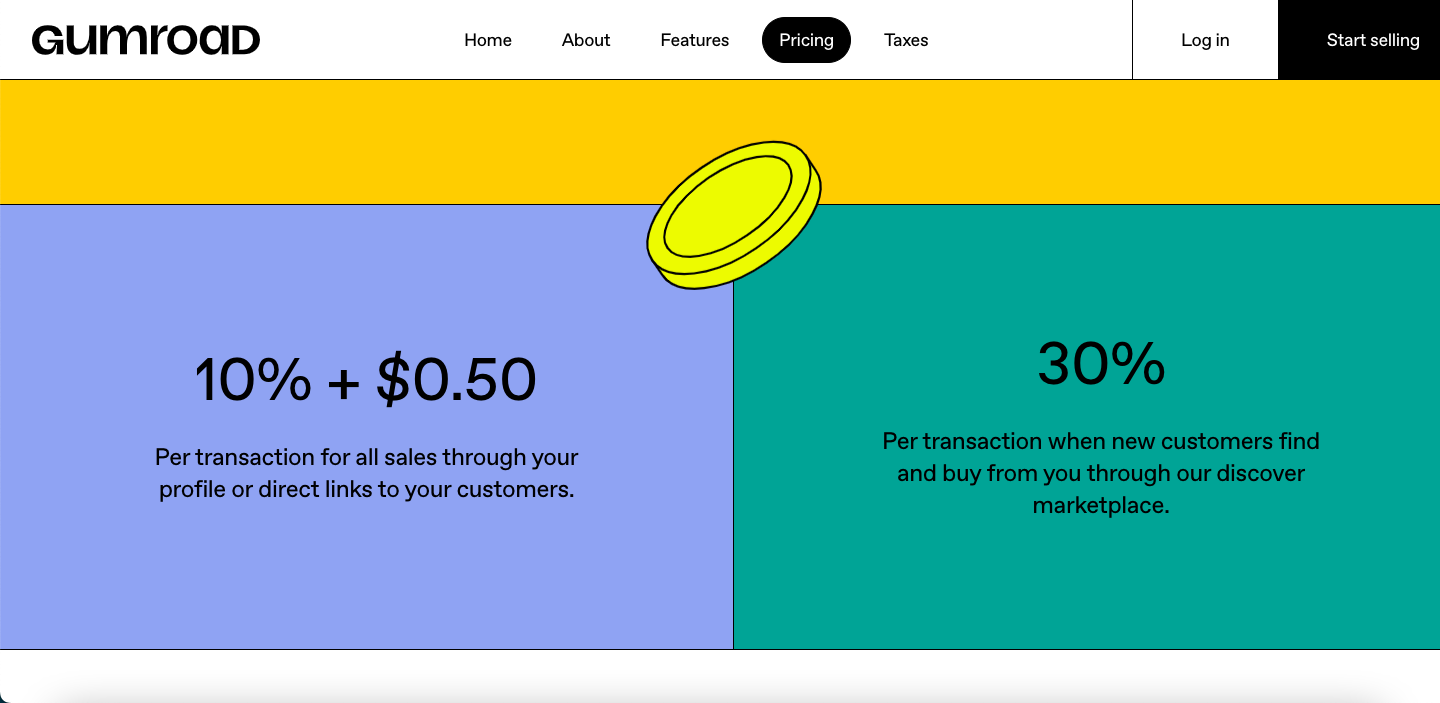
Every sale includes a 10% fee and an additional $0.50 per transaction. Gumroad also charges 30% per transaction when a customer discovers your store from the Gumroad Marketplace.
3. Shopify

Shopify is one of the most well-known online store builders. Anyone can start an online business using Shopify.
It offers a user-friendly platform and a simple store builder to make the process beginner-friendly. Shopify allows easy customization features so that your online store matches your branding. It also works with a wide variety of payment processing methods.
Key Features
Online Store Builder: Shopify offers free and paid templates to create online stores. You can also create your store from scratch to match your branding.
Shopify Payment: Shopify allows you to manage your business transactions through Shopify Payments. You can accept different payment methods, like credit cards, PayPal, etc.
Sell Digital Products: You can sell digital products on Shopify. This means you can upload digital files and sell them as products to your customers.
Efficient Inventory Management: You can easily monitor and manage your inventory. You can also enable notifications when you’re running out of stock and track product variations.
Marketing and SEO Tools: Shopify offers a variety of built-in marketing tools. You will get tools for email marketing, social media integration, and SEO features.
App Ecosystem: Shopify has a huge app store where you can find thousands of third-party apps to add new features to your store.
Scalability: You can easily scale your business with Shopify.
Pros
World-class eCommerce solutions for digital merchants
Integrations with many tools and apps through the Shopify app store
Complete inventory control through the Shopify POS Pro plan
Features for building customer profiles that are found in all plans
Lots of customization options with the app store
Cons
POS subscription also requires an eCommerce subscription
The offline mode often suffers from outages
Not the best SEO performance
Minimal checkout customization options
Pricing
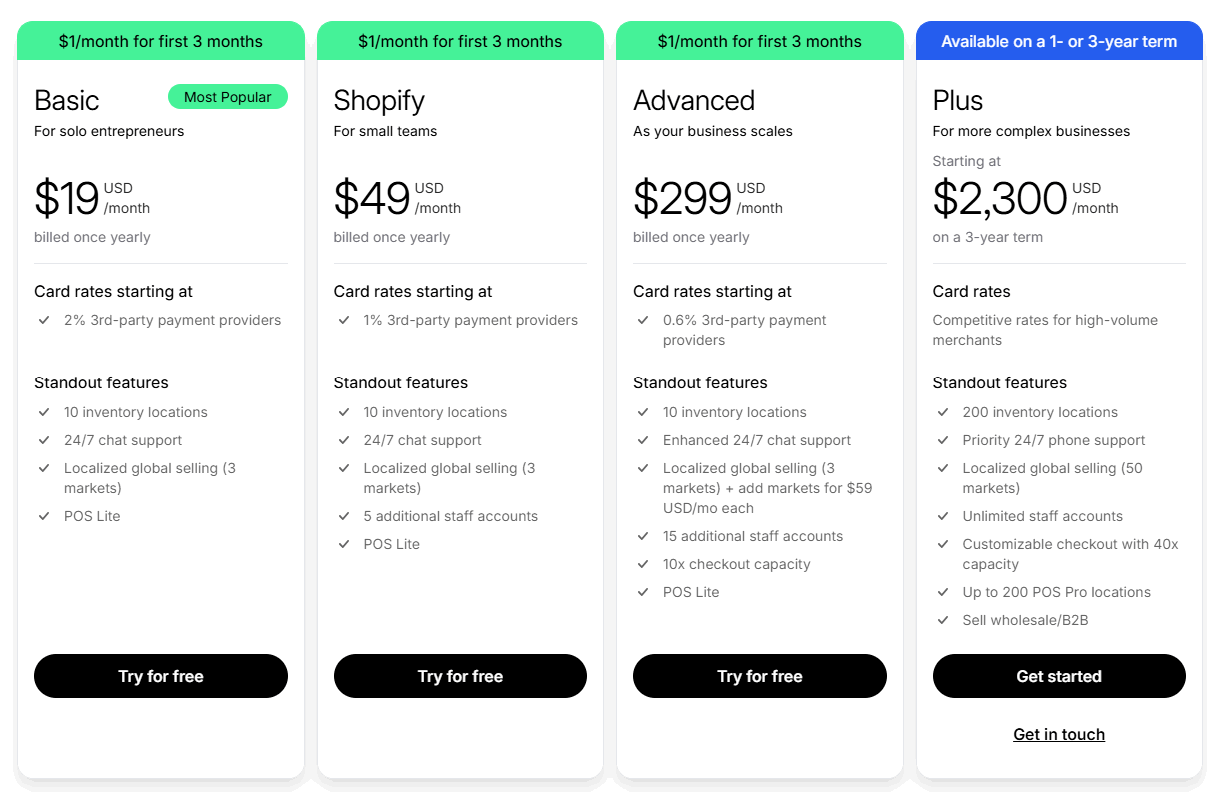
Shopify offers four pricing plans.
1. Basic: $19/month, billed annually
2. Grow: $49/month, billed annually
3. Advanced: $299/month, billed annually
4. Plus: Minimum $2,300/month with a 3-year agreement
4. Sellfy
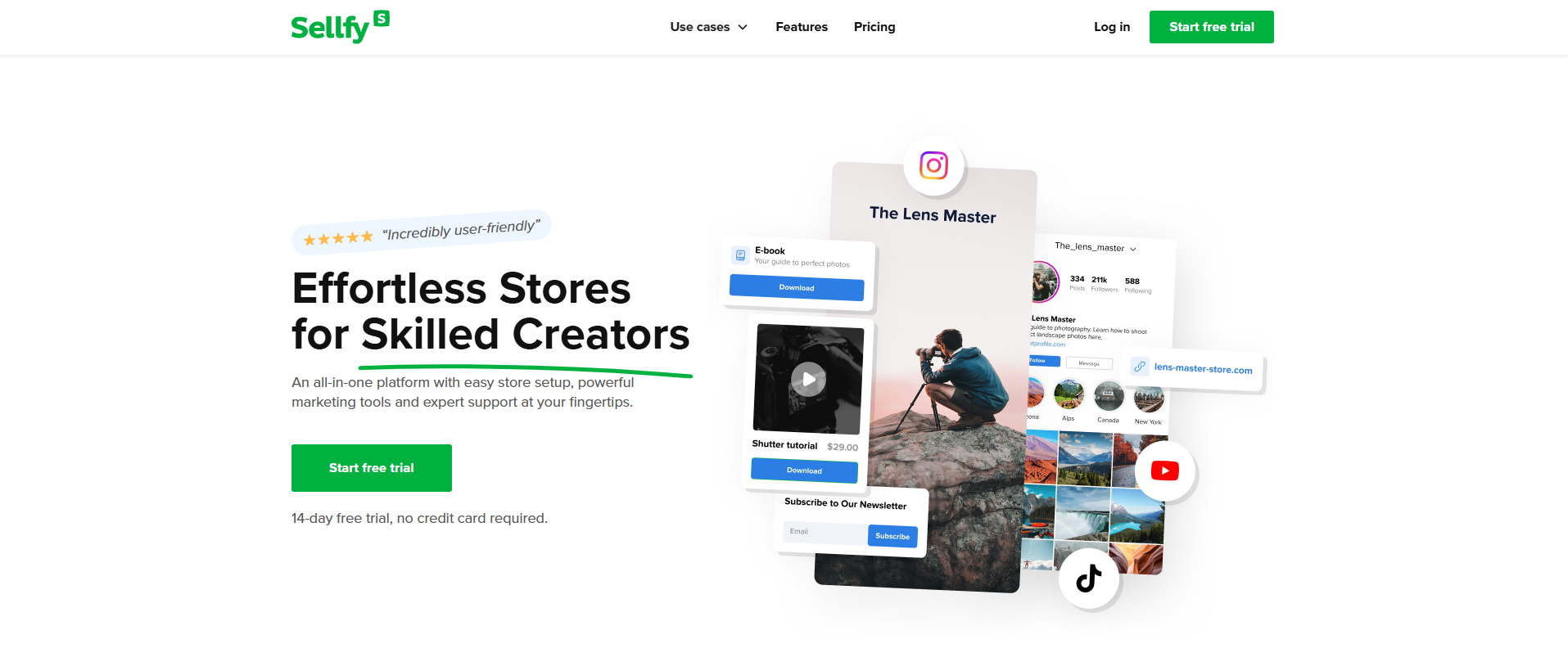
Sellfy is among the cheapest options for digital sellers today. With a large number of creators using the platform, Selffy is favored for its scalability and ease of use. Sellfy can embed into existing websites.
One of the best features that sellers love about Sellfy is its ability to give users complete freedom on how they sell their digital products.
With Sellfy, you can create your own store or embed the Sellfy cart into an already existing website. The platform offers unlimited bandwidth and provides support for your domain.
Key Features
User-Friendly: Sellfy is globally recognized for its intuitive software that allows you to get selling as soon as you set up your shop.
Built-in Marketing Features: You can make use of built-in features like email campaigns, discount coupons, and upselling to boost product sales.
No Fees: With Sellfy, you don't have transaction fees, so you keep more of your earnings than with services like Payhip.
Print-on-Demand: Sellfy provides print-on-demand solutions where you can sell merchandise without having to bother about inventory or shipping.
Subscription Ready: For frequent content creators, Sellfy makes it easy to sell memberships or recurring content.
Seamless Selling: You can seamlessly integrate a “buy now” button, or your full store on an existing website using Sellfy’s embed feature.
Pros
Accept payments in a large variety of foreign currencies
Supports leading payment processors, including PayPal and Stripe
Comes with built-in tracking and analytics
Cons
Integrations are limited
Customization is very limited
Pricing
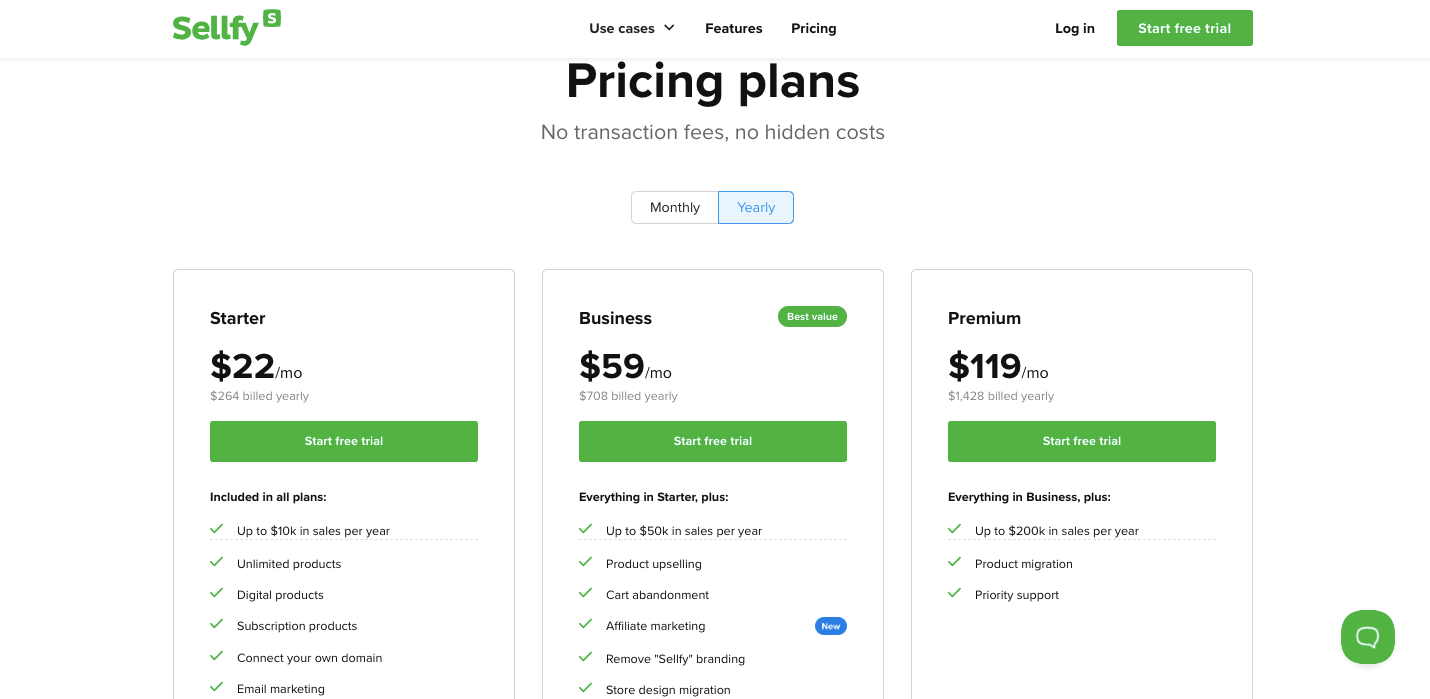
Sellfy offers three pricing plans.
1. Starter: $22/month
2. Business: $59/month
3. Premium: $119/month
5. WooCommerce
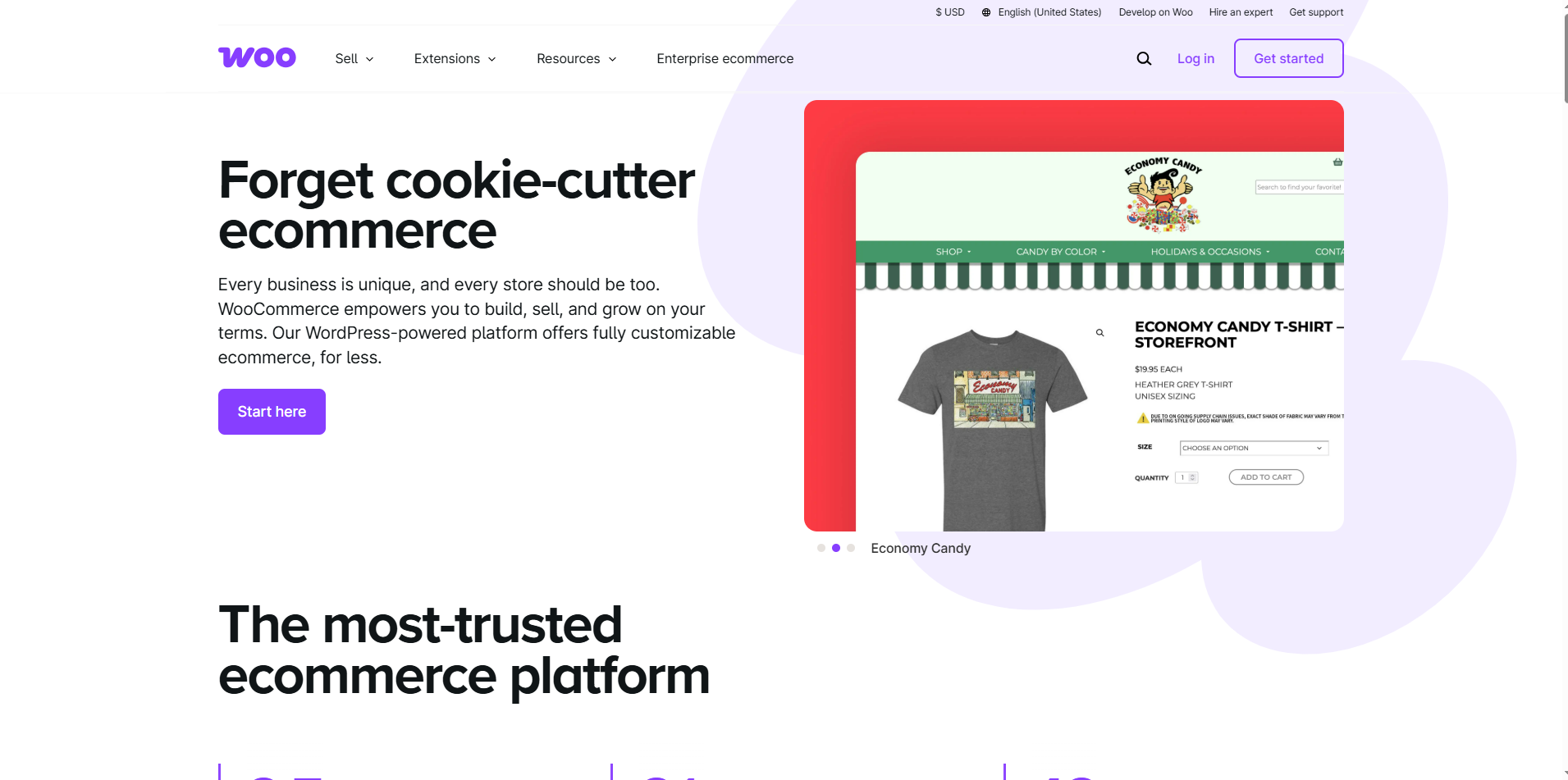
WooCommerce is the most popular solution for WordPress eCommerce. Though not a standalone site builder, within the WordPress environment, it is easy to use and simple, even for novices.
Anyone familiar with WordPress will find WooCommerce a great tool as they attempt to build out their site.
WooCommerce works well with add-ons and integrations, with tools that include email marketing, social media selling, and one-click upsells.
It does require basic coding know-how and developer insight as you scale the site. However learning the ins and outs of the platform ultimately makes management of the site so much simpler.
Key Features
Works Well with WordPress: WooCommerce is a plugin under WordPress. This helps design customization accompanied with great content management and column of WordPress themes for your online store.
Customization: WooCommerce provides vast possibilities of changing the design and functions of the online store, making it a user-friendly and highly customizable platform.
Products with Flexibility: You may vend digital downloads, courses, subscriptions and also physical items right from one store.
Payment Options: WooCommerce comes equipped with major payment gateways, including PayPal and Stripe, and also allows integration with other third-party payment processors as required.
Features of Marketing and SEO: Integration with page email services, affiliate programs, and coupon codes are some of the marketing features that WooCommerce provides. It integrates well with WordPress's SEO plugins and tools, making it easier for you to optimize your store for search engines.
Pros
Great for SEO and content marketing, such as with WordPress
Extensible with lots of apps and widgets
Tons of customizations and themes available
Plenty of support is available from the WordPress community
Highly effective for marketing and promotion
Cons
Will require some developer support
Requires extra investment in a WordPress site
Pricing
WooCommerce is a free plugin but you'll face several costs when setting up and running your store.
6. Etsy
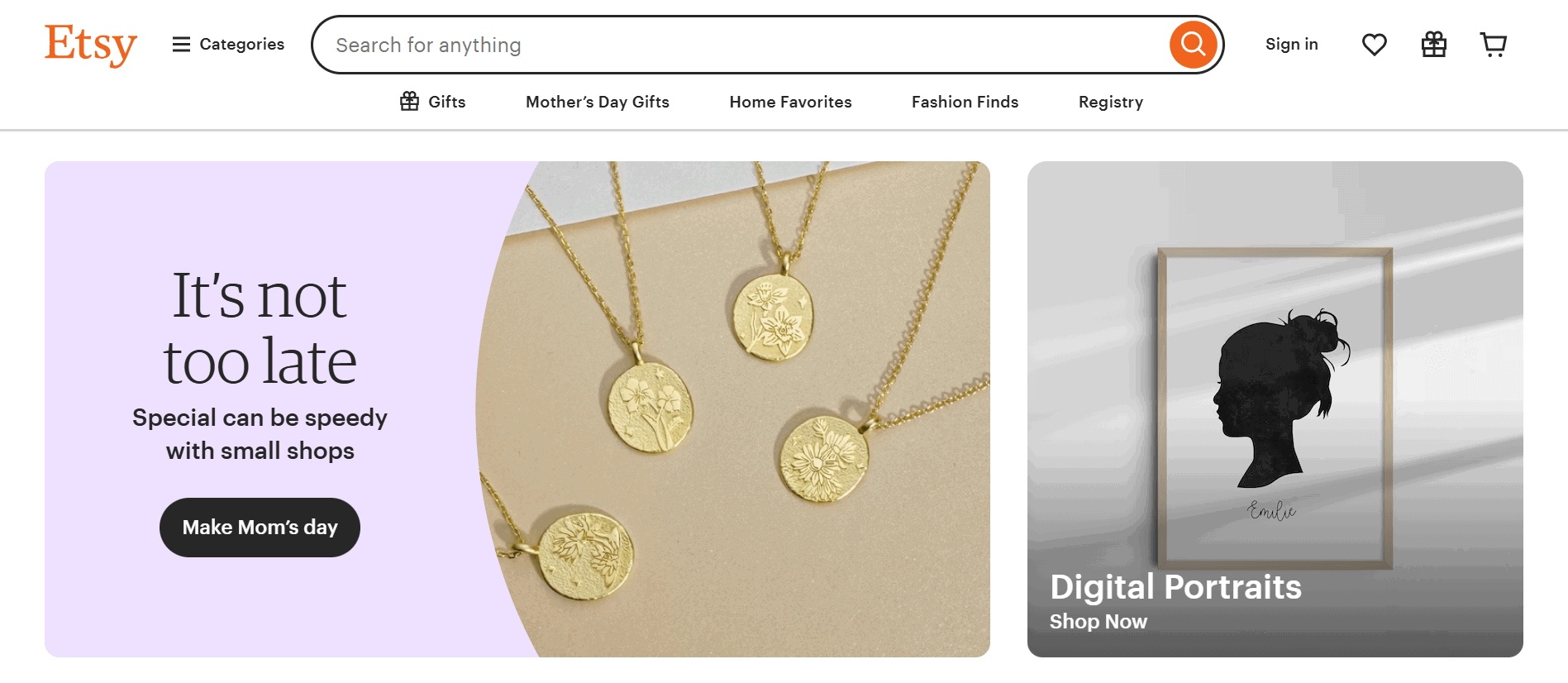
Etsy is an online marketplace. It enables independent sellers to make and sell handmade, vintage, and unique goods. It is well known for its eclectic selection of crafts, art, jewelry, and other creative products.
Thanks to Etsy, small business owners and independent makers can reach customers who are in the market for unique or custom products. Etsy helps with transactions by linking buyers and sellers. It also offers tools to help you run your business, including listing items, processing payments, and managing inventory.
Key Features
Creative Goods Selling: You can sell handmade, vintage, and creative items that stand out from typical mass-market products.
Seller Freedom: You get to run your own storefront as an independent creator, with full control over your business.
Diverse Categories: You can sell everything from jewelry and clothing to home decor and art on Etsy.
Global Audience: Etsy connects you with customers worldwide. It allows you to grow your business beyond your local market.
Extra Support: Etsy provides tools like ads, shipping labels, and other sales tools to help you manage and scale your shop.
Pros
Handmade goods offer unique, personalized items not found in mainstream stores
Creative platform supports independent artists and small businesses
Worldwide accessibility enables sellers to reach foreign markets
A user-friendly interface makes it easy to set up and manage a shop
Cons
High fees can reduce profit margins for sellers
Intense competition makes it harder for new shops to stand out
Limited customization restricts brand identity on shop pages
Pricing
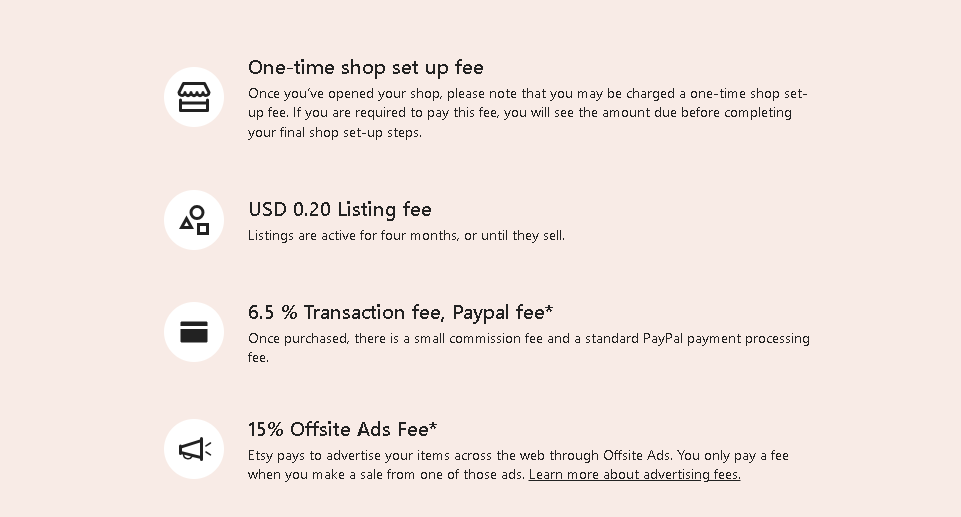
Etsy only charges you for a listing fee of $0.20 per listing and a one-time shop set-up fee. On top of that, Etsy will take a 6.5% transaction fee when you sell a product.
7. SendOwl
SendOwl is an excellent platform for selling digital products online. You can sell ebooks, courses, audio, and more. SendOwl simplifies the selling process with the necessary tools.
They integrate with a lot of widely used platforms and payment gateways so that you can use tools you are already familiar with.
In addition, SendOwl automates all the “selling” stuff, like payment processing, product delivery, and customer emails. This means you can wake up to some money in your account.
Key Features
Sell Anywhere: You can sell digital products across the web, even without your own website.
Automate Sale Opportunities: You can effortlessly automate the entire sales process, from checkout to product delivery.
Make Everything Perfectly Synchronized: SendOwl works with Shopify, Stripe, and PayPal so you can keep everything organized without extra effort.
Simplify Everything for Users Without Technical Knowledge: SendOwl helps users without any tech-related hassle to get started and is easy to utilize.
Pros
The approach to product bundling is seamless
Great overall flexibility on payment models
Supports discounts, coupons, bump offers, and one-click upsells
Cons
Limited customization for checkouts
No live chat or phone emergency support
Pricing
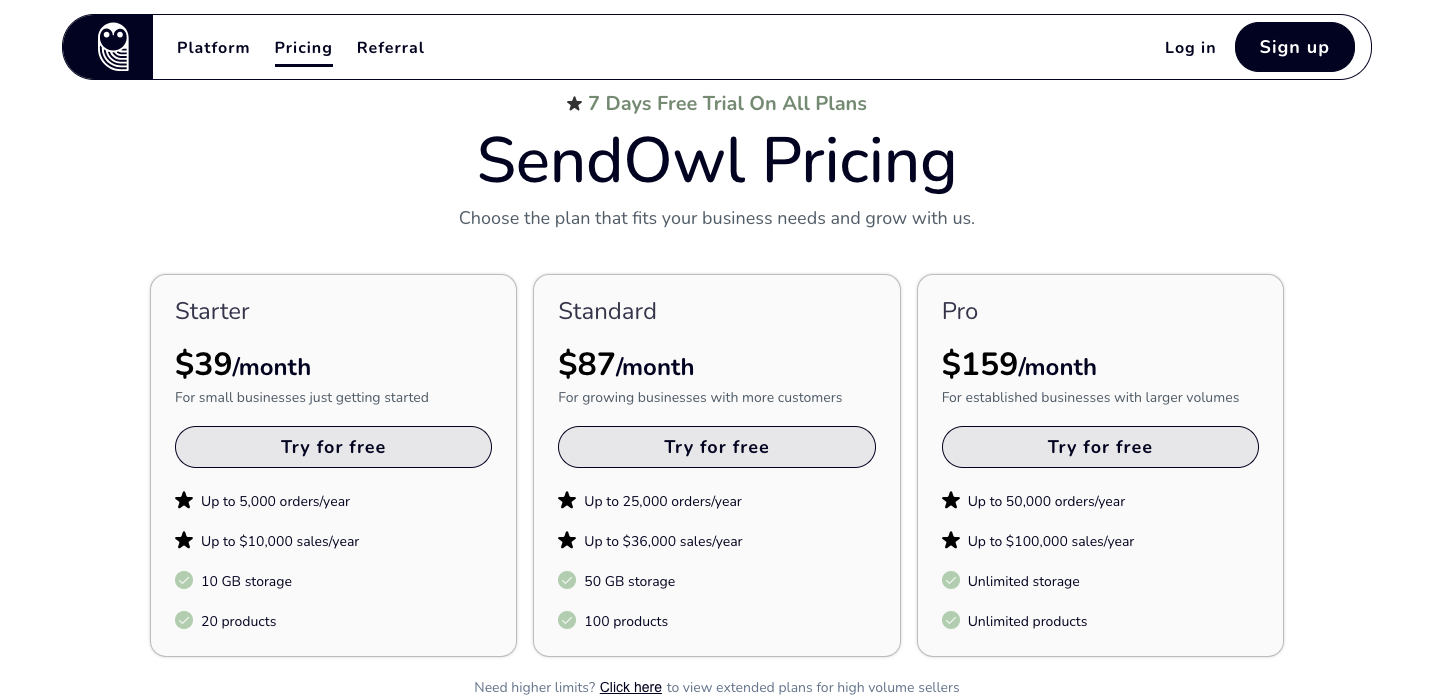
SendOwl offers three premium plans.
1. Starter: $39/month
2. Standard: $87/month
3. Pro: $159/month
8. Ko-fi
The concept of Ko-fi is to help content creators earn money by offering different ways for fans to support them. It is very easy to use since you can simply receive one-time donations, offer commissions, set up subscriptions, sell digital or physical goods, and provide other services.
In fact, Ko-fi provides a central hub for creators to reach their audience as well as earn income from their work.
Key Features
Easy to Use: Ko-fi strives to keep things easy for creators and supporters. You can design a profile page filled with content (images, text and videos) specifically for your purposes.
Monetization: Ko-fi offers different monetization opportunities for creators. Through one-time donations, fans can be invited to “buy you a coffee” or another themed item as a form of appreciation. You can also provide custom commissions to your fans.
Memberships: You can create membership levels with bonus content and rewards for fans.
Sell Various Products: With Ko-fi, you can sell physical and digital products in the Ko-fi shop.
Community Focus: You can share your work and engage your audience with posts, videos, and other content.
Pros
Zero platform fees on one-time donations increase your earnings
Customizable pages let you reflect your personal brand
Versatile support options like donations, memberships, commissions, crowdfunding, and shop features
Direct payment through PayPal or Stripe means faster access to funds
Low platform fees, allowing creators to keep a larger portion of their earnings
Cons
Limited discovery makes it harder for new users to gain visibility
Fewer integrations compared to larger platforms like Patreon
Dependence on external payment processors can cause issues if accounts are restricted
Basic analytics may not offer enough insight for growth tracking
Extra features locked behind Ko-fi Gold require a monthly fee
Pricing
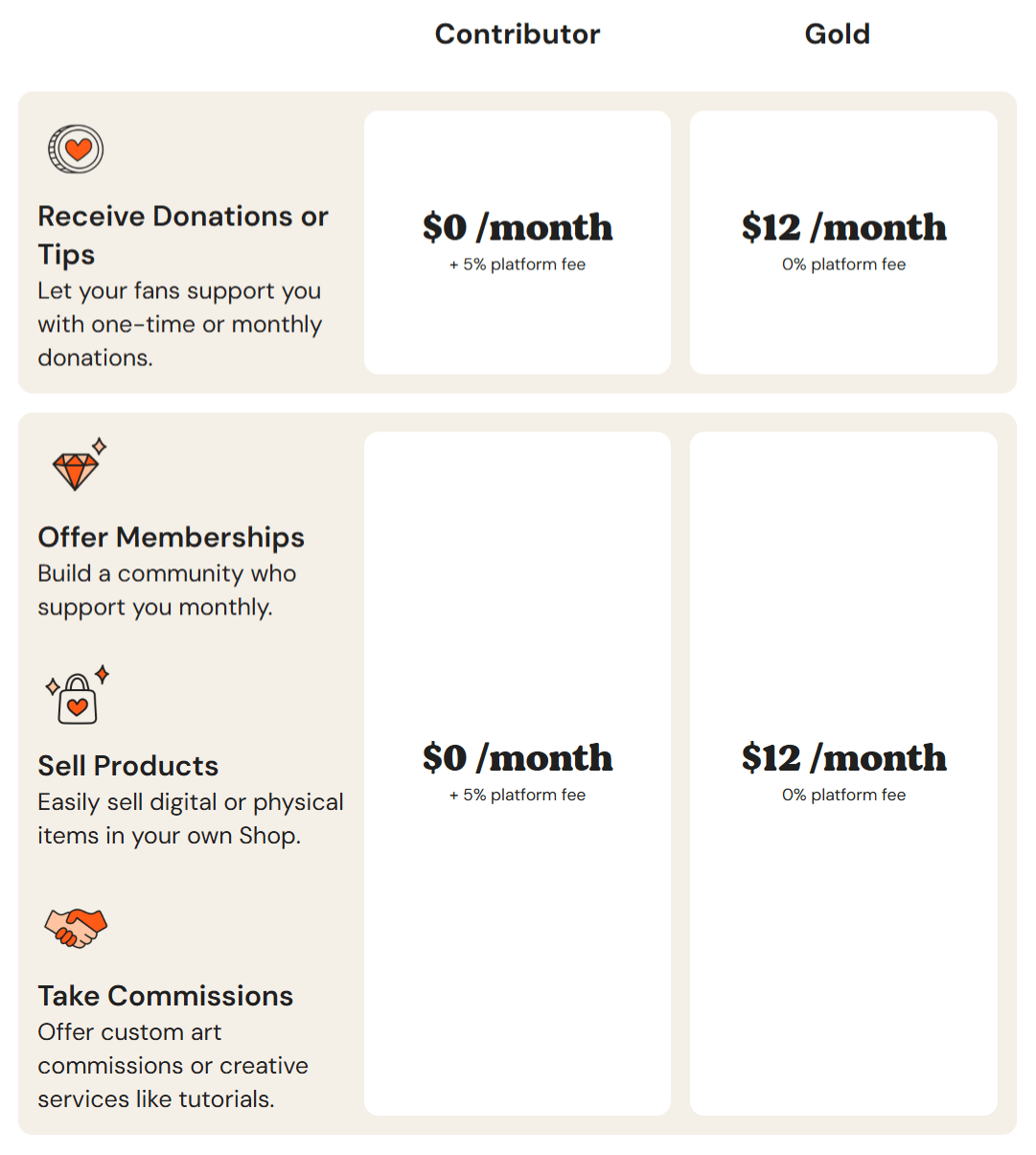
Ko-fi offers two pricing plans.
1. Free Plan: $0/month + 5% platform fee
2. Ko-fi Gold Plan: $12/month + 0% platform fee
Read more: Ko-fi vs Patreon: Which is Creators' Choice in 2026?
9. Podia
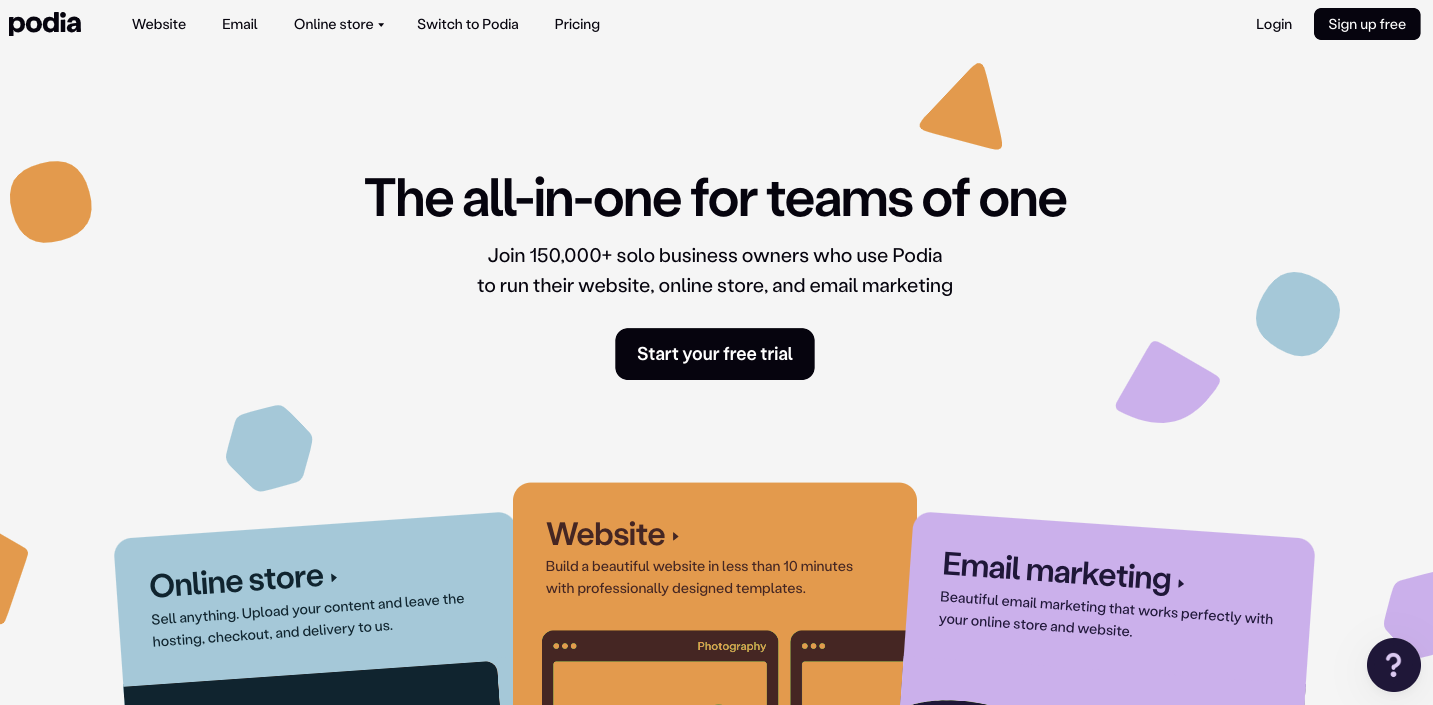
Podia is an effective online platform that enables users to sell digital goods. With digital courses and online learning, Podia is famous for hosting online courses with unlimited videos and files, audiobooks, and PDFs.
It can also integrate with popular software such as Zapier and apps like MailChimp, Google Sheets, YouTube Live, and Zoom. The platform is available with 30 days free trial.
Key Features
All-In-One: You get a complete solution for selling online products, including a website builder, sales pages, checkout, and email marketing, all in one place.
Robust Email Marketing: You can create targeted, automated email campaigns with features like automation, segmentation, filtering, and entrance/exit conditions.
Create Community: Podia allows you to start conversations and build a loyal tribe with its integrated community features.
Product flexibility: You can sell courses, downloads, webinars, memberships, and coaching without switching platforms.
Affiliate Tools: Podia gives you built-in affiliate marketing features to grow your reach and drive more sales through trusted partners.
Beginner-Friendly: Podia’s interface is clean and simple, so you can get your business running without tech overwhelm.
Pros
Beginner-friendly user interface
Unlimited emails and analytics
Communicate on live chat with your clients
Free community to grow membership
Earn passive income from video recordings and webinars
Cons
Customer support needs improvement
The pages have only lately been search engine-optimised
Students are not able to filter products due to a lack of backend categorization
Instructors are not able to embed courses externally since custom embed codes are not supported
Pricing
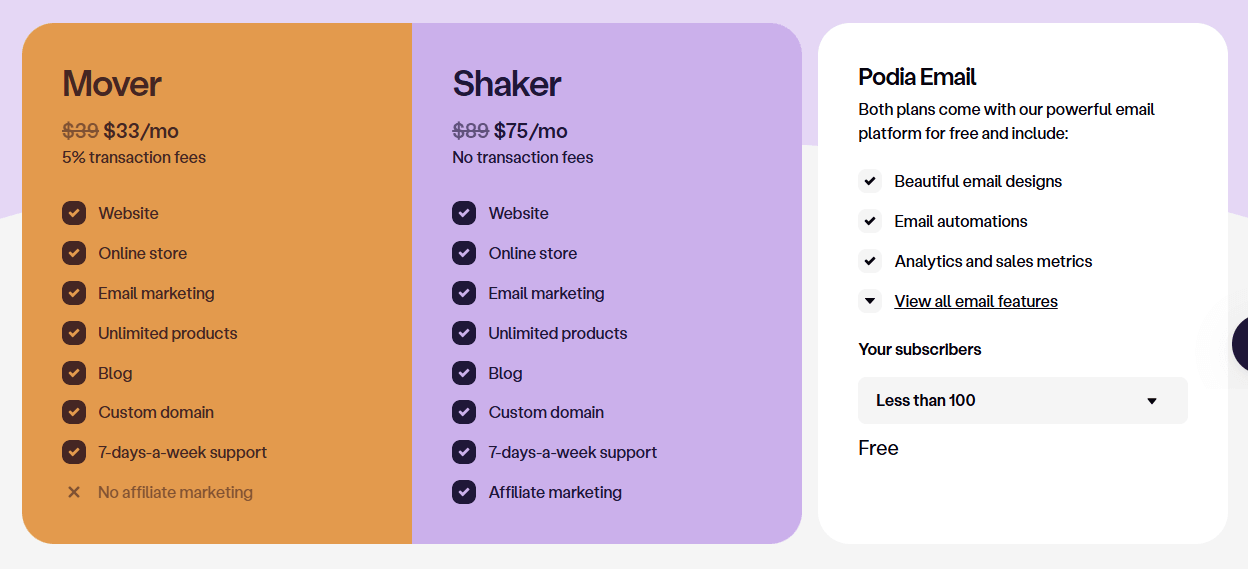
Free email marketing tools (up to 100 emails)
The Mover plan starts at $39 per month or $33/month annually (5% transaction fee)
The Shaker plan starts at $89 per month or $75/month annually (0% transaction fee)
10. Squarespace

Squarespace is a business-focused website builder. It offers features that help businesses sell products and services. It offers a collection of professionally designed pre-made templates that you can fully customize to match your brand’s look and feel.
Squarespace allows you to manage inventory, process orders, handle fulfillment, run promotions, sell digital products and subscriptions, and access detailed sales analytics all from within the platform.
It connects effortlessly with third-party tools and services, supports selling through social media, enables automated email campaigns, and provides appointment booking and calendar syncing.
Key Features
All-in-One Flexible Plans: With Squarespace, you get an all-in-one package for website creation, hosting, e-commerce functionality, and marketing tools, all under one plan.
User-Friendly: Squarespace enables you to create and maintain your own online presence, without needing to know too much about coding.
E-commerce function: It allows you to sell anything by supporting both physical and digital products, tracking the inventory, and processing the payment securely.
Marketing Tools: You get built-in email marketing, SEO features, and analytics to help grow your brand and track performance.
Flexible Payment System: You can accept payments through credit cards, Apple Pay, Klarna, Afterpay, and more, giving your customers options they’ll appreciate.
Pros
Great-looking templates on this platform
Comes with blogging features
You have 24/7 customer support
Edit pages through mobile apps
Ready-made templates to choose from
Cons
More expensive than your basic website builder
There’s only a single sub-navigation
Page speed isn’t that good
No phone support
More expensive than average competitors
Pricing
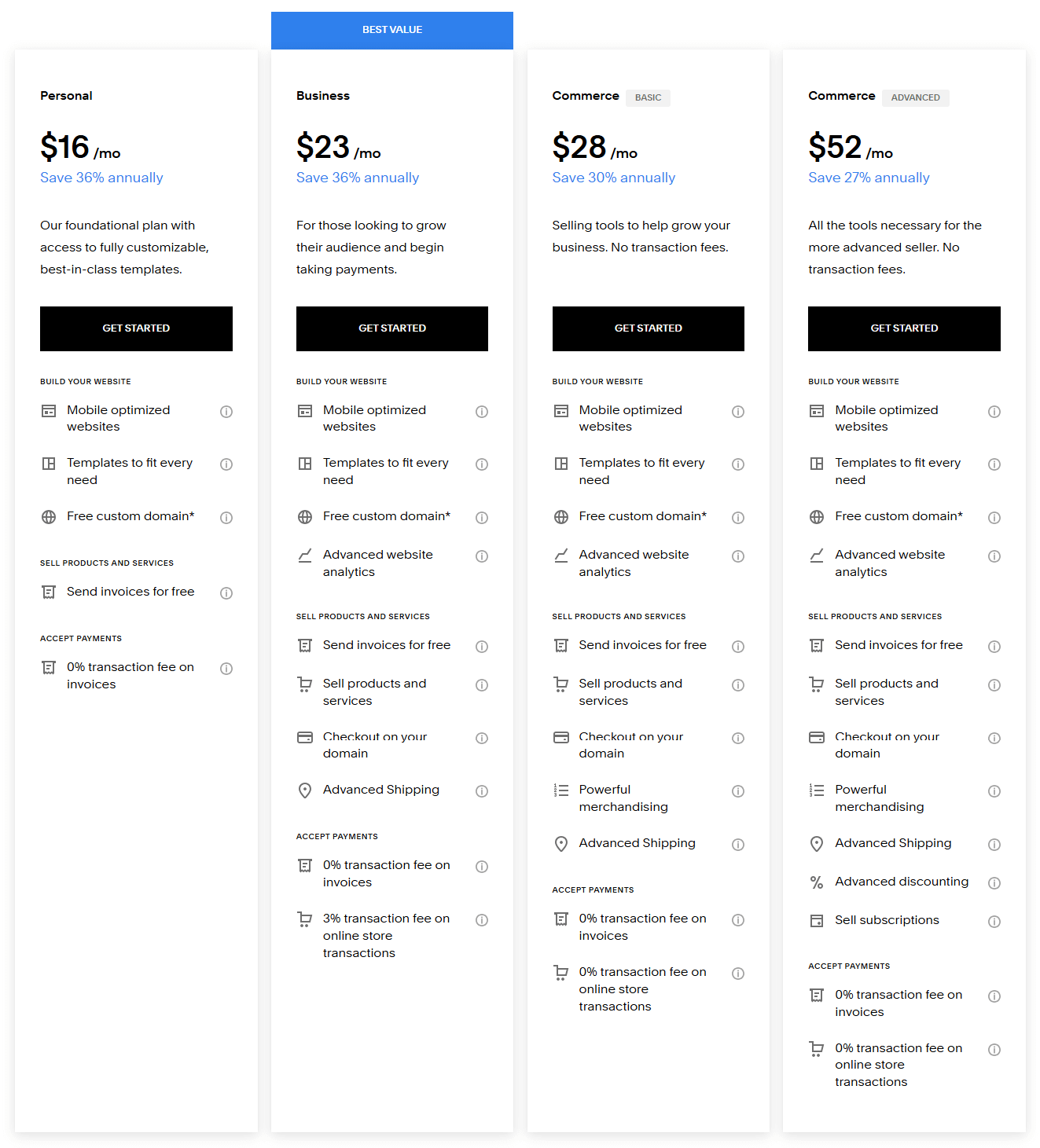
With Squarespace, you can choose from five different pricing plans based on your needs.
1. Personal: $16/month (billed annually)
2. Business: $23/month (billed annually)
3. Commerce Basic: $28/month (billed annually)
4. Commerce Advanced: $52/month (billed annually)
5. Enterprise: Custom plans
Why People Search for Payhip Alternatives
While Payhip is a great tool for selling digital products, there are some critical reasons why folks are considering alternatives.
1. Customization and Branding
Many Payhip alternatives allow for a greater degree of customization. This ensures your online business stands out and aligns with your brand identity.
2. More Limitations to Selling Courses and Memberships
Payhip is centered around the sale of digital downloads, which is great for some creators, but not ideal if you want to provide anything else. The alternatives tend to have more advanced tools for creating complete online courses, membership sites and coaching programs which allows you to offer more options for attracting and retaining customers.
3. Monetization Methods
Payhip’s payment process is straightforward, but it does not allow for varied monetization. Alternatives usually give you flexibility in the pricing of your content and products. You can charge for whatever you like, and try out different pricing models or revenue streams as you see fit for your audience.
4. Integrated Marketing Tools
Payhip is restricted by its absence of advanced marketing tools and SEO options. Most alternatives to Payhip have email marketing options and automated sales funnels integrated within the platform. These allow you to automate your marketing efforts, lead nurturing, and sales growth without having to depend on third-party tools.
5. Brand Community
If you are considering building your brand community, then Payhip may not suffice for you. Many Payhip alternatives come with integrated community-building tools to help you build a thriving online community for your brand.
Is EzyCourse Any Good As A Payhip Alternative?
When you’re looking for a Payhip alternative that goes above and beyond, EzyCourse would be one of the top choices.
Why?
Because this platform is an all-in-one solution.
Oftentimes, Payhip users complain about transaction fees and a lack of options to sell courses.
EzyCourse, on the other hand, has a comprehensive suite of features, offering courses, coaching, communities, memberships, email marketing, and so on.
Here is why it’s one of the good alternatives for digital creators who want to sell digital products in 2026:
1. Comprehensive All-in-One Platform
Unlike Payhip, which focuses mainly on digital product sales, EzyCourse gives you everything you need to manage an entire online business. From course creation to marketing automation, community engagement, and even coaching, you get a full suite of tools that integrate seamlessly to support your growth.
2. Advanced Customization for Your Brand
EzyCourse is a white-label platform. So, you can fully customize your website, sales pages, and even create a branded mobile app with it. This flexibility in customization isn’t available with Payhip. Payhip uses basic templates that limit your ability to design a platform that reflects your unique brand. On the contrary, EzyCourse allows you to create your unique brand identity.
3. Drag-and-Drop Smart Website Builder

EzyCourse offers a dynamic drag-and-drop course builder. You can build engaging courses using the builder without prior technical knowledge. You can also organize lessons, upload content, and add quizzes without coding.
4. Multiple Monetization Options
EzyCourse gives you complete flexibility over how you monetize your content. You can sell online courses, offer memberships, run free trials, or create product bundles to earn money online. EzyCourse allows you to create all of those revenue streams, something Payhip lacks. You can set different pricing models to suit your business needs.
5. Seamless Marketing Integration

EzyCourse includes built-in email marketing automation, sales funnels, and analytics tools. You can easily track user behavior and boost conversions with their help. You don’t need any third-party tools for that.
6. Community Features to Boost Engagement

EzyCourse allows you to build a dedicated community around your brand. You can do it through private groups, messaging, and forums. This is an excellent way to keep your audience engaged and connected. It can drive both retention and growth. Payhip doesn’t offer these vital community features, making it harder to build lasting relationships with customers.
So, EzyCourse is the best Payhip alternative to offer a better experience to your customers.
👉Start Free Trial with EzyCourse
Conclusion
Payhip earns its place for creators who need a dead-simple storefront with no upfront cost. But if you're serious about building a scalable online business, one that combines courses, memberships, community, and marketing under one roof, Payhip's limitations will catch up with you fast.
The right alternative depends on where you are right now:
Just starting out and want zero monthly fees? Ko-fi or Gumroad gets you selling in under an hour.
Need a full e-commerce store with physical and digital products? Shopify or WooCommerce gives you the infrastructure to scale.
Building a course, coaching, or membership business? EzyCourse is the only platform on this list that handles all three without stitching together third-party tools.
EzyCourse stands out because it eliminates the ceiling that limits most creator platforms. No transaction fees. White-label branding. Your own white-label Android & iOS mobile app. A built-in LMS, email automation, affiliate management, and community tools, all in one place. You can build your own brand with the platform.
If that's the business you're trying to build, try EzyCourse free for one month now and start your journey.
FAQs
What is the best free Payhip alternative?
Ko-fi is the strongest free Payhip alternative. It charges no monthly fee and only takes a 5% cut on sales. Gumroad also has no monthly subscription, charging 10% per transaction instead. Both work well for creators just starting out who want to sell digital products without committing to a monthly platform cost.
What is the main difference between Payhip and its alternatives?
Payhip focuses on simple digital product sales with basic storefront features and a free plan that charges 5% per transaction. Most alternatives go further. They offer full course hosting, membership management, community tools, email automation, and lower or zero transaction fees, making them better suited for creators scaling beyond simple downloads.
Which Payhip alternative has zero transaction fees?
EzyCourse and Sellfy both charge zero transaction fees on their paid plans, meaning you keep 100% of every sale. Gumroad charges 10% per transaction plus $0.50, and Ko-fi charges 5% on its free plan. If transaction fees are eating into your margins, EzyCourse or Sellfy are the strongest alternatives to consider.
Are these alternatives beginner-friendly?
Yes, most of these alternatives are beginner-friendly. EzyCourse, Sellfy, Ko-fi, and Gumroad are super easy to set up, even if you're a beginner. All of them offer a low learning curve.
Do I need coding knowledge to use these alternative platforms?
Not at all. Most options on the list are no-code or low-code. They are designed for creators and small business owners who just want to sell products without handling technical difficulties.
Which is the best Payhip alternative for selling online courses?
Online course platforms like EzyCourse and Podia would be the best Payhip alternative for selling online courses. They offer built-in course, community, coaching, and membership features for course creators.